
The Lutron Caseta Smart Switch Kit is my best overall pick for its hub, Pico remote, and wallplate, while the Tapo Matter 3-Way Dimmer Kit stands out for connected two-location dimming and the Kasa HS220P3 for straightforward single-pole dimming. Choosing among smart light switch kits comes down to matching the kit to your wiring, whether you need a dimmer or a basic on-off switch, and how you want it to work with your smart home. Three-way kits solve a different problem from single-pole kits, and a remote or hub can add convenience while requiring extra setup. I’ve ranked these picks by practical fit, control options, compatibility, and the tradeoffs buyers should expect. Read on for the full breakdown and help finding the right kit for your rooms.

Get furniture and decor delivered free — and shop member deals
- Fast, free delivery on millions of items
- Access to Prime Big Deal Days deals on October 6–7
- Prime Video, Amazon Music and more included
Complete the kit


Key Takeaways
- Lutron Caseta leads for a complete control setup: its kit combines a hub, Pico remote, and wallplate, while separate Caseta three-way and dimmer kits target more specific wiring and lighting needs.
- Three-way kits are not interchangeable with single-pole switches: Tapo S515D, Kasa KS230, Kasa HS210, and the two Caseta kits address multi-location control in different ways.
- Kasa covers the widest range of basic replacements: the HS220P3 adds dimming, while HS200P3 and HS200 focus on on-off control; each requires buyers to confirm neutral wiring.
- Matter appears in several distinct setups: Tapo S515D, Tapo S505, Enbrighten VIBE, and NeoBrite offer Matter-compatible options, but the NeoBrite bundle also includes six recessed lights.
- Pack size and lighting scope change the value calculation: the ELEGRP and GHome multipacks suit repeated switch replacements, while NeoBrite is a lighting-and-control project rather than a simple switch swap.
| Tapo Matter Smart 3-Way Dimmer Switch Kit (S515D) |  | Best for Cross-Platform 3-Way Dimming | Model: S515D KIT | Switch type: 3-way dimmer | Dimming range: 0–100% | VIEW ON AMAZON | See Our Full Breakdown |
| Kasa Smart Dimmer Switch HS220P3, Single Pole, Requires Neutral Wire |  | Best for Single-Pole Dimming | Model: HS220P3 | Circuit type: 1-way, single pole | Operating voltage: 120 VAC | VIEW ON AMAZON | See Our Full Breakdown |
| Kasa Smart Wi-Fi Light Switch, Single Pole, Neutral Wire Required, HS200P3 | 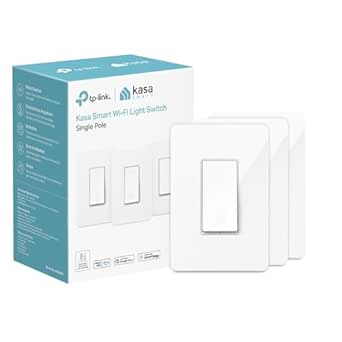 | Best for Basic Smart On/Off Control | Model: HS200P3 | Switch type: Single pole, 1-way | Wiring: Neutral wire required | VIEW ON AMAZON | See Our Full Breakdown |
| Lutron Caseta Smart Switch Kit with Hub, Pico Remote, and Wallplate |  | Best Complete Multi-Control Kit | Switches included: 2 | Hub: Lutron Caseta Smart Hub included | Remote: Wireless Pico remote included | VIEW ON AMAZON | See Our Full Breakdown |
| Kasa Smart 3-Way Dimmer Switch Kit (KS230 KIT v2) |  | Best for Alexa and Google 3-Way Dimming | Model: KS230 KIT v2 | Switch type: 3-way smart dimmer | Connectivity: 2.4 GHz Wi-Fi | VIEW ON AMAZON | See Our Full Breakdown |
| NeoBrite Matter Smart Switch and Recessed Lights Kit, 6-Pack |  | Best for a No-Neutral Ceiling Upgrade | Included lights: 6 LED downlights | Brightness: 1800 lumens | Wattage: 15 watts | VIEW ON AMAZON | See Our Full Breakdown |
| Enbrighten VIBE Matter-Compatible Wi-Fi Smart Dimmer Switch |  | Best Compact Matter Dimmer | Connectivity: 2.4 GHz Wi-Fi | Smart home compatibility: Matter, Amazon Alexa, Google Assistant | Hub required: No | VIEW ON AMAZON | See Our Full Breakdown |
| Lutron Caseta 3-Way Smart Dimmer Kit with Pico Remote and Wall Plate Bracket |  | Best for Adding a Wireless Switch Location | Included: Caseta smart dimmer, Pico 3-button remote, and Pico wall plate bracket | Maximum LED load: 150W | Maximum incandescent or halogen load: 600W | VIEW ON AMAZON | See Our Full Breakdown |
| Kasa Smart 3-Way Switch (HS210 Kit) |  | Best Guided 3-Way Switch Kit | Model: HS210 KIT | Wiring type: 3-way or single pole | Neutral wire required: Yes | VIEW ON AMAZON | See Our Full Breakdown |
| ELEGRP Smart Wi-Fi Light Switch, 2-Pack, Black |  | Best Two-Pack for Matching Black Switches | Model: SPN30 | Quantity: 2 switches | Color: Black | VIEW ON AMAZON | See Our Full Breakdown |
| GHome Smart Light Switch, Single Pole WiFi, 4 Pack |  | Best Multi-Room Starter Pack | Pack size: 4 switches | Circuit type: Single pole | Connectivity: 2.4GHz Wi-Fi; no hub required | VIEW ON AMAZON | See Our Full Breakdown |
| Kasa Smart Light Switch HS200, Single Pole |  | Best for a Single-Switch Setup | Model: HS200 | Switch type: Single pole | Connectivity: 2.4GHz Wi-Fi | VIEW ON AMAZON | See Our Full Breakdown |
| TP-Link Tapo S505 Matter Smart Light Switch, Single Pole, 2-Pack | 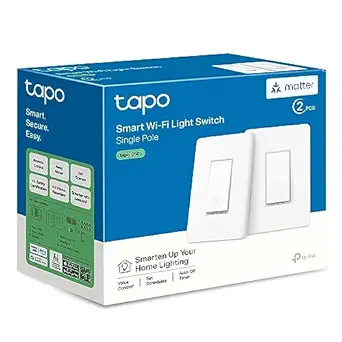 | Best for Matter Smart Homes | Model: Tapo S505 | Pack size: 2 switches | Connectivity: Matter, 2.4GHz Wi-Fi | VIEW ON AMAZON | See Our Full Breakdown |
| smart light switch kit | Connectivity | Model |
|---|---|---|
| Tapo Matter Smart 3-Way Dimmer | 2.4 GHz Wi-Fi | S515D KIT |
| Kasa Smart Dimmer Switch HS220 | 2.4 GHz Wi-Fi | HS220P3 |
| Kasa Smart Wi-Fi Light Switch | 2.4 GHz Wi-Fi | HS200P3 |
| Lutron Caseta Smart Switch Kit | — | — |
| Kasa Smart 3-Way Dimmer Switch | 2.4 GHz Wi-Fi | KS230 KIT v2 |
| NeoBrite Matter Smart Switch a | Matter, Wi-Fi | — |
| Enbrighten VIBE Matter-Compati | 2.4 GHz Wi-Fi | — |
| Lutron Caseta 3-Way Smart Dimm | — | — |
| Kasa Smart 3-Way Switch | — | HS210 KIT |
| ELEGRP Smart Wi-Fi Light Switc | 2.4 GHz Wi-Fi | SPN30 |
| GHome Smart Light Switch | 2.4GHz Wi-Fi; no hub required | — |
| Kasa Smart Light Switch HS200 | 2.4GHz Wi-Fi | HS200 |
| TP-Link Tapo S505 Matter Smart | Matter, 2.4GHz Wi-Fi | Tapo S505 |
More Details on Our Top Picks
Tapo Matter Smart 3-Way Dimmer Switch Kit (S515D)
Matter support gives this kit an advantage for households that want to manage lights through more than one major smart home platform. It dims from 0 to 100% and controls a circuit from two locations, making it a more flexible fit for a hallway or stairway than the single-pole Kasa HS220P3. The Tapo app adds schedules, away mode, fade control, and energy monitoring, so the switch can do more than replace a wall control. That wider feature set comes with setup requirements: the circuit needs a neutral wire and 2.4 GHz Wi-Fi, and wiring may call for an electrician. Compared with the Kasa KS230, its Matter compatibility is the clearer draw; buyers focused on Alexa or Google control alone may not need it.
Pros:- Controls and dims lights from two locations
- Matter certification supports major smart home platforms
- Tapo app includes energy monitoring, schedules, and away mode
- App-guided installation can help with setup
Cons:- Requires a neutral wire and 2.4 GHz Wi-Fi
- Electrical installation may require an electrician
- Its smart features may be more than needed for a basic lighting circuit
Best for: Households with a neutral wire that want a dimmable two-location circuit and Matter support across several smart home platforms.
Not ideal for: Owners of older homes without neutral wiring, or buyers who want a simple single-pole switch rather than a 3-way dimmer.
- Model:S515D KIT
- Switch type:3-way dimmer
- Dimming range:0–100%
- Connectivity:2.4 GHz Wi-Fi
- Wiring requirement:Neutral wire
- Smart home compatibility:Amazon Alexa, Apple HomeKit, Google Home, Samsung SmartThings
- App:Tapo
Our verdict“Choose the S515D if you want a two-location dimmer with Matter flexibility and are prepared for its wiring requirements.”
Kasa Smart Dimmer Switch HS220P3, Single Pole, Requires Neutral Wire
For a room with one wall-switch location, the Kasa HS220P3 keeps smart dimming straightforward: it offers 0–100% brightness control, app and voice operation, and remote access without a hub. Schedules and fade-off can make everyday lighting easier to manage, while Alexa and Google Assistant support covers common voice-control setups. That simpler circuit is also its boundary. Unlike the Tapo S515D and Kasa KS230, this model is single-pole only, so it cannot replace a 3-way arrangement controlling the same lights from two locations. It also needs a neutral wire and 2.4 GHz Wi-Fi. I’d put it ahead of the non-dimming Kasa HS200P3 when adjustable light level matters, but the HS200P3 is the more suitable Kasa pick for basic on/off control.
Pros:- Full 0–100% dimming through the switch or app
- Works with Alexa and Google Assistant
- Remote control and scheduling without a hub
- Fade-off feature supports gradual light changes
Cons:- Designed for single-pole circuits only
- Requires a neutral wire
- Connects only to 2.4 GHz Wi-Fi
Best for: Alexa or Google Assistant households seeking a hub-free dimmer for a single-pole room circuit with neutral wiring.
Not ideal for: Buyers replacing a 3-way circuit, or households whose switch box lacks a neutral wire or 2.4 GHz Wi-Fi.
- Model:HS220P3
- Circuit type:1-way, single pole
- Operating voltage:120 VAC
- Wattage:150 watts
- Connectivity:2.4 GHz Wi-Fi
- Compatible controllers:Amazon Alexa, Google Assistant, IFTTT, Nest
- Neutral wire required:Yes
- Dimensions with panel:5.06 × 3.33 × 1.74 in
Our verdict“Pick the HS220P3 for app and voice dimming on a compatible one-location circuit; choose the KS230 or S515D for 3-way control.”
Kasa Smart Wi-Fi Light Switch, Single Pole, Neutral Wire Required, HS200P3
The Kasa HS200P3 is the straightforward choice here when a buyer wants app and voice control but does not need dimming. It handles on/off operation, schedules, countdown timers, and away mode through the Kasa app, with Alexa and Google Assistant compatibility. Its 600 W rating distinguishes it from the HS220P3 dimmer’s listed 150-watt rating, though the HS200P3 cannot adjust brightness. That makes it a better match for a basic ceiling light or compatible fixture than for setting different room moods. Compared with the Lutron Caseta kit, it has no included hub or Pico remote; compared with the Kasa KS230, it cannot serve a 3-way circuit. A neutral wire and 2.4 GHz Wi-Fi are still required.
Pros:- Remote operation through the Kasa app
- Alexa and Google Assistant voice control
- Schedules, countdown timers, and away mode
- UL certified
Cons:- Does not provide dimming
- Single-pole circuits only
- Requires a neutral wire and 2.4 GHz Wi-Fi
Best for: Homeowners who want scheduled, remote on/off control for a compatible single-pole light or fixture and do not need dimming.
Not ideal for: Buyers who want dimming, need two-location 3-way control, or lack a neutral wire in the switch box.
- Model:HS200P3
- Switch type:Single pole, 1-way
- Wiring:Neutral wire required
- Connectivity:2.4 GHz Wi-Fi
- Input voltage:100–120 VAC, 50/60 Hz
- Wattage:600 W
- Control methods:Kasa app, Amazon Alexa, Google Assistant
- Safety certification:UL certified
Our verdict“Choose the HS200P3 for simple smart on/off control; step up to the HS220P3 if you want dimming.”
Lutron Caseta Smart Switch Kit with Hub, Pico Remote, and Wallplate
The Caseta kit stands apart because it bundles two switches with a hub, Pico remote, and wallplate. That package gives buyers several ways to control compatible existing bulbs: through the wall switch, app, voice assistant, or wireless Pico remote. The remote can create a wireless three-way control point, a useful option when adding another wired switch would be difficult. Compared with the Kasa KS230, this kit offers a broader collection of included control hardware and supports scenes and geofencing; the KS230 is the more direct pick for a conventional wired 3-way dimmer. Caseta’s tradeoffs are the neutral-wire requirement and dependence on its Smart Hub for voice assistant control. Buyers who only need one smart dimmer may find the multi-part kit unnecessary.
Pros:- Includes two switches, a hub, Pico remote, and wallplate
- Pico remote can add a wireless three-way control point
- Works with compatible existing bulbs
- Supports app, voice, schedules, scenes, geofencing, and timers
Cons:- Requires a neutral wire
- Voice assistant control requires the Smart Hub
- Bundled components may be unnecessary for a single-switch project
Best for: Households outfitting multiple compatible lights that want app, voice, wall-switch, and remote control, including a wireless second control point.
Not ideal for: Buyers seeking a single, hub-free 3-way dimmer or those without neutral wiring.
- Switches included:2
- Hub:Lutron Caseta Smart Hub included
- Remote:Wireless Pico remote included
- Wallplate:1 included
- Wiring requirement:Neutral wire required
- Maximum LED load:150 W
- Maximum incandescent/halogen load:600 W
- Compatible platforms:Amazon Alexa, Apple HomeKit, Google Home, Ring, Sonos, and others
Our verdict“Choose this Caseta kit if you want multiple included control options and a wireless remote point across compatible lighting.”
Kasa Smart 3-Way Dimmer Switch Kit (KS230 KIT v2)
For a wired 3-way circuit controlled from a hallway or stairway, the Kasa KS230 pairs two-location control with 1–100% dimming, schedules, remote access, and Alexa or Google Assistant voice commands. It is more targeted than the Lutron Caseta kit: the KS230 focuses on replacing a conventional 3-way dimmer, while Caseta bundles a hub, two switches, and a Pico remote for several control paths. Against the Tapo S515D, the Kasa offers a familiar app-guided setup and a stated two-year warranty, while Tapo’s Matter certification may suit homes using a wider mix of platforms. This kit still needs a neutral wire and 2.4 GHz Wi-Fi, and its listed loads cap at 150 W for dimmable LEDs or 300 W for incandescent bulbs.
Pros:- Dimming from 1–100% on a 3-way circuit
- Remote control and scheduling through the Kasa/Tapo app
- Alexa and Google Assistant voice control
- ETL certified with a two-year warranty
Cons:- Requires a neutral wire and 2.4 GHz Wi-Fi
- May require an electrician for installation
- Listed dimmable LED load is limited to 150 W
Best for: Alexa or Google Assistant users replacing a neutral-wired 3-way circuit who want dimming and scheduled control.
Not ideal for: Households without neutral wiring, those using platforms outside Alexa and Google Assistant, or circuits exceeding its listed load limits.
- Model:KS230 KIT v2
- Switch type:3-way smart dimmer
- Connectivity:2.4 GHz Wi-Fi
- Compatibility:Amazon Alexa, Google Assistant
- Maximum incandescent load:300 W
- Maximum dimmable LED load:150 W
- Certification:ETL certified
- Warranty:2 years
Our verdict“Pick the KS230 for app and voice dimming on a compatible wired 3-way circuit, especially in an Alexa or Google home.”
NeoBrite Matter Smart Switch and Recessed Lights Kit, 6-Pack
This is the most complete ceiling-lighting package in this group: it pairs a no-neutral-wire switch with six recessed LEDs, so buyers can update the controls and fixtures together. Automatic grouping is meant to simplify pairing, while Matter compatibility connects the kit to Alexa, Apple Home, Google Home, or SmartThings without a separate hub. Its adjustable white range and dimming give more control over room feel than the Enbrighten VIBE, which is designed to dim compatible existing fixtures. That breadth comes with a narrower use case: this is for recessed indoor lighting, not a general replacement switch for any fixture. It also lacks water resistance, so it is a poor fit for damp or outdoor areas.
Pros:- Includes six recessed LED downlights and a smart switch
- No neutral wire or separate hub required
- Adjustable white color from 2700K to 6500K and dimming from 5% to 100%
- Works with Matter-compatible platforms including Alexa, Apple Home, Google Home, and SmartThings
Cons:- Limited to indoor recessed-light installations
- Not water resistant
- Less suitable than a standalone dimmer such as the Enbrighten VIBE when keeping existing fixtures
Best for: Homeowners replacing several indoor recessed lights who lack neutral wiring and want adjustable white light with Matter support.
Not ideal for: Buyers who only need to smart-enable existing bulbs, or need lighting for bathrooms or other damp locations.
- Included lights:6 LED downlights
- Brightness:1800 lumens
- Wattage:15 watts
- Color temperature:2700K–6500K
- Dimming range:5%–100%
- Connectivity:Matter, Wi-Fi
- Wiring:No neutral wire required
- Mounting and use:Indoor recessed ceiling mount
- Certification:ETL
Our verdict“Choose this kit to replace indoor recessed lighting and its switch together when your wiring has no neutral.”
Enbrighten VIBE Matter-Compatible Wi-Fi Smart Dimmer Switch
The Enbrighten VIBE is a practical retrofit dimmer for buyers who want app and voice control over compatible dimmable fixtures without adding a hub. Its compact QuickFit housing and color-coded leads can help when an electrical box has little spare room, a useful distinction from the Kasa HS210 three-way kit, which focuses on app-guided switching rather than a compact dimmer setup. In-wall control still works without Wi-Fi, so a network interruption does not eliminate basic use. Smart features do depend on 2.4 GHz Wi-Fi, and the dimmer only suits compatible dimmable lighting. Its add-on support covers up to four compatible Enbrighten switches or one standard three-way switch, giving it flexibility for multi-location control, though buyers should check their fixture and wiring first.
Pros:- Matter-compatible smart control without a hub
- Compact housing and color-coded leads suit crowded electrical boxes
- Supports schedules, automations, and multi-location control
- Wall control works without Wi-Fi
Cons:- Smart features require a 2.4 GHz Wi-Fi network
- Only works with compatible dimmable fixtures
- Multi-location setups require compatible add-on switches or a standard three-way switch
Best for: Homeowners with compatible dimmable fixtures, crowded switch boxes, and a 2.4 GHz Wi-Fi network who want Matter support.
Not ideal for: Buyers with non-dimmable fixtures, no 2.4 GHz Wi-Fi, or a need for a kit that includes new light fixtures.
- Connectivity:2.4 GHz Wi-Fi
- Smart home compatibility:Matter, Amazon Alexa, Google Assistant
- Hub required:No
- Installation features:QuickFit compact housing with color-coded flying leads
- Multi-location support:Up to four compatible Enbrighten add-on switches or one standard three-way switch
- Offline operation:In-wall control works without Wi-Fi
Our verdict“Pick the VIBE for a compact, hub-free Matter dimmer when your existing lights are compatible.”
Lutron Caseta 3-Way Smart Dimmer Kit with Pico Remote and Wall Plate Bracket
The Pico remote is the deciding advantage here: it can be used wirelessly or mounted with its bracket, adding a convenient control point without running new switch wiring. The dimmer works with existing dimmable bulbs and needs no neutral wire, which makes it a stronger fit for some older homes than the neutral-required Kasa HS210 kit. For app and smart-home control, however, a Lutron Smart Hub is required; unlike the Enbrighten VIBE, this is not a hub-free Wi-Fi dimmer. The kit supports several major platforms and the hub operates without Wi-Fi, but buyers need to account for that extra component. The wallplate is sold separately, so the included bracket does not complete the wall finish.
Pros:- Pico remote creates a wireless or mountable additional control location
- Works with existing dimmable bulbs
- No neutral wire required
- Supports Alexa, Apple HomeKit, Google Home, Ring, and the Lutron app
Cons:- Lutron Smart Hub is required for app and smart-home features
- Wallplate is sold separately
- Maximum LED load is 150W
Best for: Homeowners who want a second control location for existing dimmable lights and can use or add a Lutron Smart Hub.
Not ideal for: Buyers seeking a hub-free setup or a complete kit with a wallplate included.
- Included:Caseta smart dimmer, Pico 3-button remote, and Pico wall plate bracket
- Maximum LED load:150W
- Maximum incandescent or halogen load:600W
- Neutral wire required:No
- Smart hub required:Yes
- Compatible platforms:Alexa, Apple HomeKit, Google Home, Ring, and Lutron app
- Wallplate:Sold separately
Our verdict“Choose this kit when a Pico remote solves your need for another switch location and a hub fits your setup.”
Kasa Smart 3-Way Switch (HS210 Kit)
App-guided installation is the HS210’s clearest advantage for buyers replacing a conventional 3-way switch: the instructions can make the wiring process easier to follow, while app control, schedules, timers, and away mode add useful everyday functions. Unlike the Lutron Caseta kit, it does not require a separate smart hub, but it does require a neutral wire and 2.4 GHz Wi-Fi. That rules it out for some older wiring and networks. It supports Alexa and Google Assistant, rather than the Matter compatibility offered by the Enbrighten VIBE. UL certification is listed in the product data. This is a switch kit for existing lights, not a package with new fixtures or a remote control for adding another wall location.
Pros:- App-guided installation
- Works in 3-way or single-pole setups
- Scheduling, timers, and away mode support routine control
- No separate hub required
Cons:- Requires a neutral wire
- Smart features require 2.4 GHz Wi-Fi
- Does not include a wireless remote for an additional control point
Best for: DIY homeowners replacing a 3-way or single-pole switch who have neutral wiring and 2.4 GHz Wi-Fi.
Not ideal for: People without a neutral wire, those seeking Matter support, or anyone who wants a wireless remote location included.
- Model:HS210 KIT
- Wiring type:3-way or single pole
- Neutral wire required:Yes
- Wi-Fi:2.4 GHz
- Voice assistants:Alexa, Google Assistant
- App:Kasa or Tapo
- Certification:UL certified
Our verdict“Choose the HS210 for a guided, hub-free 3-way switch upgrade if your wiring includes a neutral.”
ELEGRP Smart Wi-Fi Light Switch, 2-Pack, Black
This two-pack suits buyers updating more than one switch who want a matching black finish and straightforward app or voice control. Both switches support single-pole or 3-way installation, schedules, and countdown timers, while the no-hub setup keeps the system simple compared with the Lutron Caseta kit. The tradeoff is familiar: a neutral wire and 2.4 GHz Wi-Fi are required, and voice control is limited to Alexa and Google Assistant. The listed maximum load is 450 W, so buyers should check that against their connected lighting. Unlike the recessed-light NeoBrite kit, ELEGRP changes switch control without supplying fixtures; that makes it more flexible for existing lights, but it does not add dimming or adjustable color features in the supplied product data.
Pros:- Two switches in a matching black finish
- Supports single-pole and 3-way installations
- App control, schedules, and countdown timers
- No hub required
Cons:- Requires a neutral wire
- Smart control uses 2.4 GHz Wi-Fi and supports Alexa and Google Assistant
- Listed maximum load is 450 W
Best for: Households replacing two black switches for compatible lights that use single-pole or 3-way wiring.
Not ideal for: Homes without neutral wiring or 2.4 GHz Wi-Fi, and buyers who need a dimmer or Matter support.
- Model:SPN30
- Quantity:2 switches
- Color:Black
- Connectivity:2.4 GHz Wi-Fi
- Installation:Single-pole or 3-way; neutral wire required
- Input:120 V AC, 60 Hz
- Maximum wattage:450 W
- Dimensions:5.16 × 3.35 × 2.36 in
- Certifications:UL, FCC
Our verdict“Pick the ELEGRP two-pack to replace two compatible switches in black without adding a hub.”
GHome Smart Light Switch, Single Pole WiFi, 4 Pack
The GHome four-pack suits buyers who want to add app and voice control to several single-pole lights in one project. It covers the basics—remote control, schedules, and Away Mode—without a separate hub, while Alexa and Google Assistant support makes it easy to include in a voice-controlled home. Compared with the single Kasa HS200, this pack gives you more switches to outfit multiple rooms, though the HS200 may be a simpler choice if you only need one. The tradeoff is wiring and network fit: each location needs a neutral wire, and the switches connect only to 2.4GHz Wi-Fi. Check both before buying; this kit is a poor match for homes with older wiring or a 5GHz-only setup. UL and FCC certification and overload protection add useful product safeguards.
Pros:- Four switches let buyers cover multiple rooms in one installation
- Works with Alexa and Google Assistant for voice control
- App supports remote control, schedules, and Away Mode without a hub
- UL and FCC certified, with flame-retardant housing and overload protection
Cons:- Requires a neutral wire at every switch location
- Supports 2.4GHz Wi-Fi only
- Single-pole design does not suit lights controlled from multiple switch locations
Best for: Homeowners with several single-pole lights, neutral wiring, and Alexa or Google Assistant who want to outfit multiple rooms at once
Not ideal for: Buyers without neutral wires, homes using only 5GHz Wi-Fi, or anyone needing three-way control
- Pack size:4 switches
- Circuit type:Single pole
- Connectivity:2.4GHz Wi-Fi; no hub required
- Voice assistants:Amazon Alexa, Google Assistant
- Wiring:Neutral wire required
- Cover dimensions:4.72 × 2.76 × 0.34 in
- Certifications:UL, FCC
Our verdict“Choose the GHome pack to equip several neutral-wired, single-pole lights with app and voice control in one project.”
Kasa Smart Light Switch HS200, Single Pole
The Kasa HS200 is a straightforward pick when one ordinary single-pole light is the target. Its app-guided installation, remote control, schedules, and Away Mode cover the central smart-switch tasks without requiring a hub. Compared with the GHome four-pack, the HS200 is better suited to a one-switch upgrade; GHome makes more sense when several rooms need switches at once. The tradeoffs are practical: this model still requires a neutral wire and 2.4GHz Wi-Fi, and the supplied guidance cannot make unfamiliar electrical work comfortable for everyone. Buyers unsure about wiring may need an electrician. Unlike the Tapo S505 Matter, the HS200 description lists Alexa and Google Assistant compatibility but not Matter or Apple Home support, so it is a more limited fit for households choosing switches around cross-platform integration.
Pros:- App-guided installation helps users follow setup steps
- Remote control, scheduling, and Away Mode are supported
- Works with Amazon Alexa and Google Assistant
- UL certified
Cons:- Neutral wiring is required and may be absent in older homes
- Works on 2.4GHz Wi-Fi only
- Single-pole switch does not replace a three-way kit
Best for: Buyers replacing one single-pole wall switch who already use Alexa or Google Assistant and have neutral wiring
Not ideal for: Households seeking Matter or Apple Home support, homes without neutral wiring, or buyers who need a multi-switch pack
- Model:HS200
- Switch type:Single pole
- Connectivity:2.4GHz Wi-Fi
- Wiring:Neutral wire required
- Voice assistants:Amazon Alexa, Google Assistant
- Dimensions:4.13 × 1.71 × 1.74 in
- App compatibility:Android 5.0+, iOS 10+
- Certification:UL
Our verdict“Pick the HS200 for a single neutral-wired light when Alexa or Google Assistant support is enough.”
TP-Link Tapo S505 Matter Smart Light Switch, Single Pole, 2-Pack
The Tapo S505 two-pack stands apart through Matter support: it is designed to work with Apple Home, Alexa, Google Home, and Samsung SmartThings when connected through compatible Matter setups. That makes it a stronger choice than the Kasa HS200 for households that want broader platform flexibility, while the Kasa may suit buyers who only need Alexa or Google Assistant. Tapo also supports local network control, so basic operation can continue when internet access is unavailable, alongside voice commands, schedules, and timers. The tradeoff is that Matter does not remove the installation requirements: these are single-pole switches that need neutral wiring and 2.4GHz Wi-Fi. Buyers looking for multi-location control should compare a three-way kit from the roundup instead. With two switches in the box and a two-year warranty, it suits a small upgrade across a couple of rooms.
Pros:- Matter support spans several major smart-home platforms
- Local network control can work when internet access is unavailable
- Two switches cover a small multi-room upgrade
- Includes scheduling, timers, voice control, and app-guided setup
Cons:- Requires neutral wiring at each installation location
- Requires 2.4GHz Wi-Fi
- Single-pole design does not support lights controlled from multiple switch locations
Best for: Matter smart-home owners who want two single-pole switches that can join compatible Apple Home, Alexa, Google Home, or SmartThings setups
Not ideal for: Buyers without neutral wires, those needing three-way switching, or households without a 2.4GHz Wi-Fi network
- Model:Tapo S505
- Pack size:2 switches
- Connectivity:Matter, 2.4GHz Wi-Fi
- Smart-home platforms:Apple Home, Amazon Alexa, Google Home, Samsung SmartThings through Matter
- Switch type:Single pole
- Wiring:Neutral wire required
- Certification and warranty:UL certified; 2-year warranty
Our verdict“Choose the Tapo S505 when Matter compatibility and local control matter more than three-way coverage.”

How We Picked
I ranked these kits by how clearly they solve a buyer’s lighting-control need: single-pole replacement, multi-location switching, dimming, remote operation, or a broader lighting installation. I gave more weight to a well-matched kit with useful controls and a clear role than to a long feature list, since wiring and room fit determine whether a switch can do its job. Smart home compatibility and the practical value of included hardware, such as a hub or remote, also shaped the order.
The ranking separates complete, flexible setups from narrower or more basic options. Lutron Caseta earns the lead for bundling a hub and Pico remote into a polished control kit; the Tapo and Kasa three-way kits rank for buyers solving multi-location control, while Kasa’s single-pole options offer a simpler path. Multipacks and the recessed-light bundle can fit larger projects, but their usefulness depends on replacing multiple switches or lights at once. Every pick has a limitation, so I also weighed setup scope and the need to check wiring before buying.
Factors to Consider When Choosing Smart Light Switch Kits
Before picking a kit, map the switch location and the job it needs to do. A smart switch purchase can go wrong when the product type, wiring, or smart home setup does not match the room. These broader checks can help narrow the field before comparing individual models.
Match the switch to the circuit
Start by identifying whether the light is controlled from one wall location or two or more. A single-pole switch is for one control point; a three-way kit is designed for a light controlled from multiple locations. Replacing only one switch in a multi-location circuit with a standard single-pole model can leave the controls behaving incorrectly. Check the product’s wiring diagram and the existing switch arrangement before ordering. If the setup is unclear, photograph the wiring and consult a qualified electrician instead of guessing. The extra planning takes less time than buying a kit that cannot serve the circuit.
Check for a neutral wire before choosing
Many smart switches need a neutral wire to stay powered while the light is off. Older homes may not have one in every switch box, even if other boxes do. Turn off power at the breaker and inspect only if you can do so safely; wire color alone is not a reliable way to identify conductors. Confirm the exact model’s requirements, since related switches from the same brand can differ. If a neutral is absent, look specifically for a compatible no-neutral design or ask an electrician about your options. This check can eliminate several otherwise appealing picks before you spend time comparing apps.
Decide whether you need dimming or simple on-off control
A dimmer is useful when the bulbs and fixture support dimming and you want adjustable light levels. A standard smart switch can be a better fit for fans, non-dimmable bulbs, or rooms where simple scheduling and voice control matter more than brightness adjustment. Dimmers can flicker or buzz when paired with incompatible bulbs, so check the bulb maker’s compatibility guidance as well as the switch specifications. Consider who uses the room: a physical paddle may be easier for guests than an app-only routine. Do not pay for dimming features if your bulbs cannot use them. In a mixed home, matching switch type to each fixture is often more practical than standardizing on one model.
Treat Matter compatibility as one part of the setup
Matter can make it easier to connect compatible devices across supported smart home platforms, but it does not remove every setup requirement. Check that your controller, app, and home network support the device’s connection method and the features you want. A Matter label also does not guarantee that every advanced control works identically in every platform. If you already rely on Alexa, Google Home, Apple Home, or another system, verify the specific pairing and automation support before buying several switches. Hub-based kits add hardware and another setup step, but may offer a coordinated remote-control experience. Choose for the system you actually use rather than treating compatibility labels as a substitute for checking details.
Plan for physical controls and household routines
Smart controls should still make sense when someone reaches for the wall. A remote can help where a second wall control is impractical, while an ordinary switch interface may be easier for visitors and household members to understand. Think through what happens during a Wi-Fi outage, a phone change, or a guest visit, and check the manufacturer’s details on local control. Also check the switch’s size and the space available in the electrical box, especially if it already holds several wires. A kit with more accessories can simplify control placement, yet it also brings more parts to install and manage. Prioritize the controls that fit your daily habits instead of adding a remote or hub without a clear use.
Compare project scope, not just the number of switches
Multipacks can make sense when several compatible rooms need the same basic function, but a bundle is less useful if your circuits need different switch types. Count switch locations and identify dimming needs before choosing a pack. A kit that includes recessed lights is a wider installation project, so compare it with the cost and effort of replacing only the switch. Check what is included in each box and whether wallplates, remotes, or hubs are part of the kit. For a gradual upgrade, buying one unit first can reveal app and fit issues before a whole-home installation. For a coordinated renovation, matching devices may simplify setup, provided every circuit meets the same requirements.
Frequently Asked Questions
How can I tell whether I need a three-way smart switch kit?
If the same light can be switched from two locations, such as both ends of a hallway, the circuit commonly uses a three-way arrangement. A single-pole kit is intended for one control location and may not work correctly in that setup. Check how many switches control the light and consult the kit’s wiring instructions, since multi-location kits can handle the companion switch differently. The Tapo S515D, Kasa KS230, Kasa HS210, and Caseta three-way kit serve this broader control need, but they are not identical in function. When the wiring is unfamiliar, have an electrician identify the circuit before installation.
Should I choose a hub-based kit or a Wi-Fi switch?
A hub-based kit can coordinate a dedicated remote with the wall control and may suit buyers who want a physical control point beyond the switch itself. It also adds a device to set up and keep connected. Wi-Fi switches can be more direct when you want app and voice control without buying a separate hub, though they depend on the home network and model-specific platform support. Decide whether the remote is useful in your room and whether you are comfortable maintaining another hub. The Caseta kit’s included hub and Pico remote make that tradeoff explicit.
Will a smart dimmer work with my existing LED bulbs?
Not automatically: both the bulbs and the dimmer must support compatible dimming behavior. Incompatible combinations can flicker, buzz, or fail to dim smoothly. Check the switch manufacturer’s bulb guidance and the bulb packaging before replacing a working setup. If you do not need variable brightness, a standard on-off switch avoids this compatibility question. For rooms with mixed bulbs, confirm each bulb type rather than assuming one compatible bulb makes the whole fixture suitable.
Is a multipack a good choice if I am upgrading several rooms?
A multipack is convenient when the rooms share the same circuit type, wiring needs, and control preference. It can be a poor fit if one room needs a dimmer, another is three-way, or some switch boxes lack neutral wiring. Make a room-by-room list before choosing a pack, including bulb type and how many wall locations control each light. The ELEGRP and GHome packs target multiple switch replacements, while the Tapo S505 pack offers a Matter-oriented option. Buying one device first can help confirm the app experience and physical fit before committing to a larger installation.
Can I install a smart switch without knowing how to identify the wires?
You should not guess at wiring based on color or a quick look. Switch circuits can vary, and a smart kit may require a neutral, line, load, or traveler connections that must be identified correctly. Follow the model’s instructions and cut power at the breaker before any inspection; if you cannot confidently identify the conductors, hire a qualified electrician. This is especially relevant for three-way circuits, where the wiring arrangement can be less intuitive. Confirming compatibility before purchase can also prevent an installation attempt with a kit that does not fit the circuit.
Conclusion
For the broadest all-in-one control setup, I recommend the Lutron Caseta Smart Switch Kit as best overall, especially if you will use its hub and Pico remote. The Kasa HS200 is my best value direction for a basic single-pole smart switch, while the Caseta 3-Way Dimmer Kit is the premium fit for buyers who want multi-location dimming with a remote. Beginners who have confirmed neutral wiring and need one-location dimming should start with the Kasa HS220P3 for its focused role. For Matter-focused homes, compare the Tapo S505 for straightforward single-pole control with the Tapo S515D when the circuit needs three-way dimming; choose NeoBrite only if the recessed lights suit a larger lighting project. The right pick follows from your circuit and daily controls, so verify those first and then match the kit to the job.
Halloween Picks
halloween
As an affiliate, we earn on qualifying purchases.