
Premium whole-home mesh WiFi systems promise one thing: fast, reliable internet in every corner of your house, without dead zones or constant repositioning. In this category, the real decision comes down to whether you need cutting-edge Wi-Fi 7 performance or whether a mature Wi-Fi 6/6E system covers your home for less. The NETGEAR Orbi 970 Series stands out as the best overall pick thanks to its dedicated wireless backhaul and top-tier tri-band Wi-Fi 7 hardware, while the eero Pro 7 is the strongest choice for buyers who want dead-simple setup and built-in smart-home routing. On the value side, the TP-Link Deco XE75 Pro delivers tri-band Wi-Fi 6E and a 2.5G port at a price that undercuts most rivals. The main tradeoffs you’ll face are cost versus future-proofing, wired versus wireless backhaul, and app ecosystems with subscription upsells versus genuinely free features. Keep reading for the full breakdown of all 15 systems.

Get furniture and decor delivered free with Prime
- Fast, free delivery on millions of items
- Prime Video, Amazon Music and more included
- Member-only deals all year
Complete the kit


Key Takeaways
- Dedicated backhaul is what separates the true premium picks: the Orbi 970 and Deco 7 Pro reserve spectrum for node-to-node communication, so speeds hold up at the far edges of your home where dual-band systems like the Deco X55 fall off sharply.
- Wi-Fi 7 is now the default at the premium tier — nine of the fifteen systems here support it — but Wi-Fi 6E systems like the eero Pro 6E and Deco XE75 Pro still deliver nearly identical real-world speeds for homes without multi-gig internet.
- TP-Link‘s Deco lineup dominated the value end of this comparison, with the X55 Pro and XE70 Pro offering port configurations and coverage that rival NETGEAR systems costing considerably more.
- Renewed units (the Orbi 370 and Deco XE75 Pro) are the smartest way into premium hardware on a budget, but warranty terms are shorter and cosmetic variation is a real risk worth weighing.
- Subscription models differ sharply: eero and NETGEAR both gate advanced security and parental controls behind paid tiers, while TP-Link includes most equivalent features free — a difference that compounds over years of ownership.
| TP-Link Deco X15 Dual-Band AX1500 WiFi 6 Mesh Wi-Fi System (3-Pack) |  | Best Budget Entry Point | Wi-Fi Standard: Wi-Fi 6 (AX1500) | Bands: Dual-band | Max Speed: 1,201 Mbps (5 GHz) / 300 Mbps (2.4 GHz) | VIEW ON AMAZON | See Our Full Breakdown |
| eero Pro 6E Mesh Wi-Fi System (3-Pack) |  | Best for App Experience and Ecosystem Simplicity | Wi-Fi Standard: Wi-Fi 6E | Coverage: Up to 6,000 sq. ft. | Units: 3-pack | VIEW ON AMAZON | See Our Full Breakdown |
| TP-Link Deco 7 BE23 Dual-Band Wi-Fi 7 Mesh System (3-Pack) |  | Best Value Wi-Fi 7 Upgrade | Wi-Fi Standard: Wi-Fi 7 | Max Speed: Up to 3.6 Gbps | Bands: Dual-band | VIEW ON AMAZON | See Our Full Breakdown |
| NETGEAR Orbi 360 Series WiFi 7 Mesh System, 3 Pack |  | Best for Flexible Expansion | Wi-Fi Standard: Wi-Fi 7 | Max Speed: Up to 5 Gbps | Bands: Dual-band with enhanced backhaul | VIEW ON AMAZON | See Our Full Breakdown |
| TP-Link Deco AXE5400 Tri-Band WiFi 6E Mesh System (Deco XE75 Pro) – 3-Pack (Renewed) | 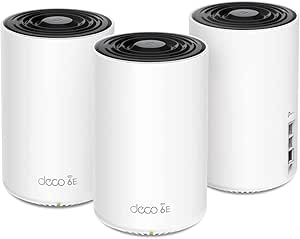 | Best Coverage Per Dollar (Renewed Pick) | Wi-Fi Standard: Wi-Fi 6E (AXE5400) | Bands: Tri-band (6 GHz, 5 GHz, 2.4 GHz) | Max Speed: 5,400 Mbps | VIEW ON AMAZON | See Our Full Breakdown |
| eero Pro 7 Tri-Band Mesh Wi-Fi 7 Router (3-Pack) |  | Best for Ecosystem Simplicity | Coverage: 6,000 sq. ft. | Number of Units: 3 | Wireless Speed: up to 3.9 Gbps | VIEW ON AMAZON | See Our Full Breakdown |
| TP-Link Deco X55 AX3000 WiFi 6 Mesh System (3-Pack) |  | Best Value in a Premium Lineup | Wi-Fi Standard: WiFi 6 (AX3000) | Coverage: 6,500 sq. ft. | Device Capacity: up to 150 devices | VIEW ON AMAZON | See Our Full Breakdown |
| NETGEAR Orbi 970 Series WiFi 7 Mesh System, 3 Pack | 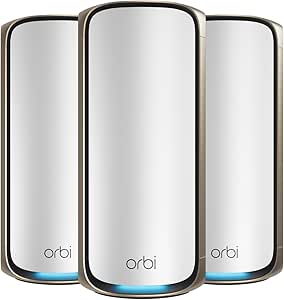 | Best for Maximum Coverage and Speed | WiFi Standard: WiFi 7 | Coverage: 10,000 sq. ft. | Number of Devices: up to 200 | VIEW ON AMAZON | See Our Full Breakdown |
| NETGEAR Orbi 770 Series WiFi 7 Mesh System, 3 Pack |  | Best Wi-Fi 7 Step-Down Pick | Coverage: Up to 8,000 sq. ft. | Number of Units: 3 Pack | WiFi Technology: WiFi 7 | VIEW ON AMAZON | See Our Full Breakdown |
| TP-Link Deco 7 Pro BE17000 Tri-Band Wi-Fi 7 Whole Home Mesh System |  | Best Wired Connectivity | Coverage: 8,500 sq. ft. | Wi-Fi Bands: Tri-band Wi-Fi 7 | Total Bandwidth: 17 Gbps | VIEW ON AMAZON | See Our Full Breakdown |
| TP-Link Deco XE70 Pro AXE4900 Tri-Band WiFi 6E Mesh WiFi System, 3-Pack |  | Best for High-Density Smart Homes | Wi-Fi Standard: Wi-Fi 6E (AXE4900) | Band Configuration: Tri-band with dedicated 6 GHz | Maximum Speed: 4.9 Gbps | VIEW ON AMAZON | See Our Full Breakdown |
| Google WiFi AC1200 Mesh WiFi Router System Bundle (3-Pack) – Snow |  | Best Plug-and-Play Simplicity | Wi-Fi Standard: Wi-Fi 5 (AC1200) | Band Configuration: Dual-band | Maximum Speed: AC1200 | VIEW ON AMAZON | See Our Full Breakdown |
| NETGEAR Orbi 370 Series Dual-Band WiFi 7 Mesh Network System (RBE373) – Renewed |  | Best Budget Path to Wi-Fi 7 | Wi-Fi Standard: Wi-Fi 7 | Band Configuration: Dual-band | Maximum Speed: Up to 5 Gbps | VIEW ON AMAZON | See Our Full Breakdown |
| TP-Link Deco X55 Pro AX3000 Whole Home Wi-Fi 6 Mesh System, 3-Pack |  | Best Value for Wired Backhaul | Wi-Fi Standard: Wi-Fi 6 (AX3000) | Band Configuration: Dual-band | Coverage Area: Up to 6,500 sq. ft. | VIEW ON AMAZON | See Our Full Breakdown |
| NETGEAR Orbi 370 Series WiFi 7 Mesh System, 3 Pack | | Best New-Condition Wi-Fi 7 Coverage | Wi-Fi Standard: Wi-Fi 7 | Band Configuration: Dual-band | Maximum Speed: Up to 5 Gbps | VIEW ON AMAZON | See Our Full Breakdown |
| premium wholehome mesh wifi system | Wi-Fi Standard | Coverage | Number of Units | Security |
|---|---|---|---|---|
| TP-Link Deco X15 Dual-Band AX1 | Wi-Fi 6 (AX1500) | Up to 5,600 sq. ft. | — | — |
| eero Pro 6E Mesh Wi-Fi System | Wi-Fi 6E | Up to 6,000 sq. ft. | — | — |
| TP-Link Deco 7 BE23 Dual-Band | Wi-Fi 7 | Up to 6,500 sq. ft. | — | WPA3, HomeShield, VPN support |
| NETGEAR Orbi 360 Series WiFi 7 | Wi-Fi 7 | Up to 6,000 sq. ft. | — | NETGEAR Armor (30-day trial), Advanced Router Protection |
| TP-Link Deco AXE5400 Tri-Band | Wi-Fi 6E (AXE5400) | Up to 7,200 sq. ft. | — | TP-Link HomeShield |
| eero Pro 7 Tri-Band Mesh Wi-Fi | — | 6,000 sq. ft. | 3 | — |
| TP-Link Deco X55 AX3000 WiFi 6 | WiFi 6 (AX3000) | 6,500 sq. ft. | — | TP-Link HomeShield |
| NETGEAR Orbi 970 Series WiFi 7 | — | 10,000 sq. ft. | 3 (router + 2 satellites) | — |
| NETGEAR Orbi 770 Series WiFi 7 | — | Up to 8,000 sq. ft. | 3 Pack | NETGEAR Armor, Advanced Router Protection |
| TP-Link Deco 7 Pro BE17000 Tri | — | 8,500 sq. ft. | 3 | — |
| TP-Link Deco XE70 Pro AXE4900 | Wi-Fi 6E (AXE4900) | — | 3 | Advanced security with parental controls and IoT protection |
| Google WiFi AC1200 Mesh WiFi R | Wi-Fi 5 (AC1200) | — | 3 | — |
| NETGEAR Orbi 370 Series Dual-B | Wi-Fi 7 | — | 1 router + 2 extenders | — |
| TP-Link Deco X55 Pro AX3000 Wh | Wi-Fi 6 (AX3000) | — | 3 | Enhanced security features with cybersecurity support |
| NETGEAR Orbi 370 Series WiFi 7 | Wi-Fi 7 | — | 3 (1 router + 2 satellites) | Advanced Router Protection with NETGEAR Armor free trial |
More Details on Our Top Picks
TP-Link Deco X15 Dual-Band AX1500 WiFi 6 Mesh Wi-Fi System (3-Pack)
This option stands out as the most accessible way into whole-home mesh in this lineup, offering 5,600 sq. ft. of coverage and support for 120 devices without the Wi-Fi 6E or Wi-Fi 7 hardware premiums. Compared with the eero Pro 6E, the Deco X15 trades the dedicated 6 GHz band for a lower barrier to entry, which matters if your devices are mostly Wi-Fi 5 or Wi-Fi 6 anyway — the newer bands would sit idle. The AI-driven mesh does a respectable job rerouting traffic, and wired backhaul through the two Gigabit ports per unit helps offset the lack of a third band. The real tradeoff is raw speed: AX1500 means roughly 1.2 Gbps shared across the whole network, so multi-gig internet plans will go to waste here.
Pros:- Wide 5,600 sq. ft. coverage from three units at an entry-level price point
- Handles up to 120 connected devices, strong for smart-home-heavy homes
- Wired backhaul support lets you firm up performance between nodes
- HomeShield security and parental controls included at the base tier
Cons:- AX1500 speeds are the slowest in this roundup, capping total network throughput
- Only two Gigabit Ethernet ports per unit and no multi-gig port
- Dual-band design forces wireless backhaul and client traffic to share the same 5 GHz band
Best for: Households with standard internet plans (under 500 Mbps) who want reliable whole-home coverage for many smart devices at a low cost
Not ideal for: Owners of gigabit-plus fiber plans or households that move huge files internally — the AX1500 ceiling will bottleneck both
- Wi-Fi Standard:Wi-Fi 6 (AX1500)
- Bands:Dual-band
- Max Speed:1,201 Mbps (5 GHz) / 300 Mbps (2.4 GHz)
- Coverage:Up to 5,600 sq. ft.
- Units:3-pack
- Ethernet per Unit:2x Gigabit
- Wired Backhaul:Yes
- Device Support:Up to 120 devices
Our verdict“A sensible pick if you want dependable mesh coverage on a modest internet plan and don’t need the speed headroom of Wi-Fi 6E or 7.”
eero Pro 6E Mesh Wi-Fi System (3-Pack)
The eero Pro 6E earns its spot for having the cleanest setup and management experience of the three-kit systems here. While the Deco XE75 Pro offers more raw coverage and a 2.5 Gbps port, eero counters with automatic updates, true plug-and-play onboarding, and backward compatibility with older eero units, which is rare — you can extend an existing eero network instead of starting over. The 6 GHz band keeps latency low for gaming and video calls, and the 2.5 Gb Ethernet port means gigabit-plus plans are properly fed. The catch: the best features sit behind a subscription. Advanced parental controls, ad blocking, and deeper network insights require eero+, so the ownership cost climbs over time in a way the TP-Link alternatives don’t demand to the same degree.
Pros:- Class-leading app with automatic updates and genuinely simple onboarding
- Wi-Fi 6E support with a 2.5 Gb Ethernet port for gigabit+ plans
- Backward compatible with prior eero generations for gradual expansion
- 6,000 sq. ft. of coverage with low latency across 100+ devices
Cons:- Advanced security and parental controls locked behind a paid subscription
- Full 6 GHz benefits only materialize with newer Wi-Fi 6E client devices
- Fewer wired ports per node than the Deco XE75 Pro for wired backhaul setups
Best for: Buyers who prioritize effortless setup and app-based control, especially anyone already running eero hardware they want to expand
Not ideal for: Tinkerers who want full router control and premium security features without an ongoing subscription fee
- Wi-Fi Standard:Wi-Fi 6E
- Coverage:Up to 6,000 sq. ft.
- Units:3-pack
- Internet Plan Support:Up to 2.5 Gbps
- Wireless Speed:Up to 1.6 Gbps
- Wired Speed:Up to 1 Gbps (2.5 Gb port available)
- Device Support:100+ devices
Our verdict“The right choice if you value a frictionless, ecosystem-managed network over maximum specs and subscription-free software.”
TP-Link Deco 7 BE23 Dual-Band Wi-Fi 7 Mesh System (3-Pack)
This model makes the most sense for buyers who want Wi-Fi 7 hardware without the flagship price. Unlike the pricier Deco 7 Pro BE17000 or the NETGEAR Orbi 360, the BE23 is a dual-band system, so it hits 3.6 Gbps rather than the multi-gig tri-band numbers — but that’s still triple the throughput of the Deco X15 and more than most homes can use today. The 2.5 Gbps WAN/LAN ports on every unit are the standout here, beating the eero Pro 6E’s port configuration and giving you genuine multi-gig wired backhaul. Coverage of 6,500 sq. ft. with 150-device capacity also makes it the strongest option here for smart-home-dense households. The honest tradeoff: Wi-Fi 7 client devices are still scarce, so most of your gear will run on legacy compatibility and never touch the new speeds.
Pros:- 2x 2.5 Gbps WAN/LAN ports per unit enable true multi-gig wired backhaul
- Up to 3.6 Gbps Wi-Fi 7 speeds with backward compatibility
- Handles 150 devices, the highest capacity in this batch
- WPA3, VPN support, and HomeShield security built in
Cons:- Dual-band design shares backhaul with client traffic, unlike tri-band rivals
- Wi-Fi 7 benefits require compatible client devices that few homes own yet
- A 3-pack is overkill for homes under 3,000 sq. ft.
Best for: Future-focused upgraders with multi-gig internet who want next-gen Wi-Fi readiness and 2.5G wired backhaul at a mid-tier price
Not ideal for: Anyone with only Wi-Fi 5/6 devices and a sub-gigabit plan — the Wi-Fi 7 hardware will go largely unused
- Wi-Fi Standard:Wi-Fi 7
- Max Speed:Up to 3.6 Gbps
- Bands:Dual-band
- Coverage:Up to 6,500 sq. ft.
- Units:3-pack
- Ports per Unit:2x 2.5 Gbps WAN/LAN
- Device Support:150 devices
- Security:WPA3, HomeShield, VPN support
Our verdict“A smart middle path if you want 2.5G ports and Wi-Fi 7 headroom now, without paying tri-band flagship prices.”
NETGEAR Orbi 360 Series WiFi 7 Mesh System, 3 Pack
The Orbi 360’s defining strength is scalability. With satellites that each add up to 2,000 sq. ft. and enhanced backhaul baked into the dual-band design, this system is better suited to growing or awkwardly shaped homes than the fixed three-unit kits from TP-Link. Its 5 Gbps Wi-Fi 7 ceiling sits above the Deco 7 BE23’s 3.6 Gbps, though below the flagship Orbi 970 Series — this is deliberately the middle of NETGEAR’s stack. Setup through the Orbi app is straightforward, and compatibility with any internet provider removes friction for households that switch ISPs. The tradeoff is NETGEAR’s subscription habit: NETGEAR Armor is only a 30-day trial, after which full network security becomes a recurring cost, while the 70-device ceiling is noticeably lower than TP-Link’s 150-device ratings in this same roundup.
Pros:- Expandable design with satellites adding up to 2,000 sq. ft. each
- Wi-Fi 7 speeds up to 5 Gbps with enhanced backhaul
- Works with any internet provider and all Wi-Fi 5/6/7 devices
- Simple guided setup and management via the Orbi app
Cons:- NETGEAR Armor security requires a paid subscription after the 30-day trial
- 70-device limit trails TP-Link alternatives rated for 120–150 devices
- Real-world coverage can fall short of the rated 6,000 sq. ft. in homes with dense walls
Best for: Owners of large or multi-storey homes who anticipate adding satellites over time and want strong 5 Gbps Wi-Fi 7 performance
Not ideal for: Smart-home-heavy households with 70+ devices, or buyers who refuse to pay subscriptions for security features
- Wi-Fi Standard:Wi-Fi 7
- Max Speed:Up to 5 Gbps
- Bands:Dual-band with enhanced backhaul
- Coverage:Up to 6,000 sq. ft.
- Units:3-pack
- Expansion:Up to 2,000 sq. ft. per added satellite
- Device Support:Up to 70 devices
- Security:NETGEAR Armor (30-day trial), Advanced Router Protection
Our verdict“Pick this if your priority is a mesh network you can grow into; skip it if you want subscription-free security and huge device counts.”
TP-Link Deco AXE5400 Tri-Band WiFi 6E Mesh System (Deco XE75 Pro) – 3-Pack (Renewed)
Among these five, the XE75 Pro delivers the largest coverage claim at 7,200 sq. ft., and its tri-band design — a dedicated 6 GHz band — gives it a structural advantage over both the dual-band Deco X15 and Deco 7 BE23, since backhaul traffic gets its own lane. The 2.5 Gbps WAN/LAN port matches the BE23 for multi-gig plans, and AI-driven mesh tuning keeps devices anchored to the strongest node. Compared with the eero Pro 6E, you get broader coverage, more wired ports per unit, and more included software without a mandatory subscription for basics. Two honest caveats: this is a renewed unit, so warranty and cosmetic condition depend on the refurbisher, and HomeShield Pro’s advanced features cost extra monthly. If a like-new warranty matters more than coverage, the eero is the safer bet.
Pros:- 7,200 sq. ft. of coverage, the largest footprint in this batch
- Tri-band Wi-Fi 6E with a dedicated 6 GHz band for low-interference backhaul
- 2.5 Gbps WAN/LAN port supports multi-gig internet plans
- Base security and parental controls included without a required subscription
Cons:- Renewed condition means variable warranty and cosmetic quality depending on seller
- HomeShield Pro advanced features carry a monthly subscription cost
- Requires a separate modem, and 6 GHz benefits depend on newer client devices
Best for: Owners of very large homes (5,000+ sq. ft.) with multi-gig internet who want tri-band performance and accept renewed hardware for the savings
Not ideal for: Buyers who want full manufacturer warranty coverage and pristine-condition hardware out of the box
- Wi-Fi Standard:Wi-Fi 6E (AXE5400)
- Bands:Tri-band (6 GHz, 5 GHz, 2.4 GHz)
- Max Speed:5,400 Mbps
- Coverage:Up to 7,200 sq. ft.
- Units:3-pack
- Ports per Unit:1x 2.5 Gbps WAN/LAN, 2x Gigabit LAN
- Condition:Renewed
- Security:TP-Link HomeShield
Our verdict“The strongest coverage-and-specs package in this group for large homes, provided renewed hardware doesn’t give you pause.”
eero Pro 7 Tri-Band Mesh Wi-Fi 7 Router (3-Pack)
The eero Pro 7 stands out for making Wi-Fi 7 feel approachable. Its TrueMesh software is among the most refined in the category, with automatic optimization that quietly reroutes traffic without manual fiddling — a genuine advantage over the TP-Link Deco X55, which leans on the Deco app but offers less hands-off network intelligence. With support for internet plans up to 5 Gbps and a 600+ device ceiling, this system is built to absorb smart-home sprawl far beyond what the Orbi 970’s 200-device limit anticipates.
The tradeoff is layered: the best security features sit behind a subscription, and raw throughput trails the Deco 7 Pro’s 17 Gbps aggregate. Buyers chasing maximum wireless headroom should look elsewhere; buyers wanting a system that manages itself will appreciate it here.
Pros:- Handles 600+ simultaneous devices — the highest capacity in this lineup
- TrueMesh software automatically optimizes routing without manual intervention
- Supports internet plans up to 5 Gbps with backward compatibility
- 3-year warranty outlasts most competitors’ coverage
Cons:- Advanced security features require a paid eero subscription
- Aggregate wireless speed (3.9 Gbps) lags other Wi-Fi 7 systems in this guide
- Premium price relative to its real-world throughput
Best for: Smart-home owners with dozens (or hundreds) of connected devices who want a network that manages itself
Not ideal for: Buyers who refuse subscription fees for security features or want maximum raw Wi-Fi 7 throughput without recurring costs
- Coverage:6,000 sq. ft.
- Number of Units:3
- Wireless Speed:up to 3.9 Gbps
- Supported Internet Speed:up to 5 Gbps
- Device Capacity:600+ devices
- Backward Compatibility:Yes
- Warranty:3 years
Our verdict“This is the pick for households that value effortless management and massive device capacity over headline speed numbers.”
TP-Link Deco X55 AX3000 WiFi 6 Mesh System (3-Pack)
Not everyone needs Wi-Fi 7, and the Deco X55 proves it. While the Orbi 970 chases 27 Gbps theoretical speeds, this Wi-Fi 6 system delivers 6,500 sq. ft. of coverage and gigabit-class performance at a fraction of the cost — enough for virtually any fiber plan most homes actually have today. Compared with the eero Pro 7, it offers more coverage per node and six total Ethernet ports, which matters if you have wired devices scattered around the house.
The compromises are real but predictable: AX3000 speeds will feel dated as multi-gig plans spread, and its 150-device ceiling is half the Deco 7 Pro’s capacity. Still, for buyers who want the coverage and reliability of a premium mesh without paying for radio technology they can’t yet use, this option makes the most sense.
Pros:- 6,500 sq. ft. of coverage matches or beats several pricier Wi-Fi 7 systems here
- Six total Ethernet ports across the three units — the most wired flexibility in this batch
- Straightforward app-guided setup that beginners can finish in minutes
- HomeShield security included at the base tier
Cons:- Wi-Fi 6 hardware will age faster than the Wi-Fi 7 options in this roundup
- 150-device limit is modest for smart-home-heavy households
- Requires a separate modem for most ISPs
Best for: Buyers on gigabit or sub-gigabit internet plans who want large-home mesh coverage without paying for unused Wi-Fi 7 speed
Not ideal for: Households with multi-gig internet plans or 100+ connected devices — AX3000 and the 150-device cap will bottleneck both
- Wi-Fi Standard:WiFi 6 (AX3000)
- Coverage:6,500 sq. ft.
- Device Capacity:up to 150 devices
- Ethernet Ports:3 per unit, 6 in total
- Mesh System:Yes
- Security:TP-Link HomeShield
Our verdict“The smart budget play: premium-tier coverage and reliability today, without the Wi-Fi 7 tax.”
NETGEAR Orbi 970 Series WiFi 7 Mesh System, 3 Pack
The Orbi 970 is the ceiling of this roundup. With 10,000 sq. ft. of coverage and a 27 Gbps aggregate — more than double the Deco 7 Pro’s 17 Gbps and dwarfing the Orbi 770’s 11 Gbps — it exists for estates, multi-floor homes with dense construction, and buyers with multi-gig fiber who refuse to compromise. The 10G WAN port on each unit also makes it the most future-proofed wired backbone here, outclassing the Deco X55’s gigabit-only ports.
That power comes at a cost beyond the price tag: its 200-device ceiling is a third of what the eero Pro 7 supports, which is an odd limitation for a system at this level. Advanced security also requires a NETGEAR Armor subscription. This model is better suited to speed-and-coverage-first buyers than to device-dense smart homes.
Pros:- 10,000 sq. ft. coverage — the largest footprint in this entire roundup
- Up to 27 Gbps aggregate, the fastest wireless spec here by a wide margin
- 10G and 2.5G multi-gig ports on every unit for wired backhaul and servers
- Orbi app makes setup and management genuinely simple despite the hardware’s complexity
Cons:- The most expensive system in this batch by a substantial margin
- Advanced security locked behind a NETGEAR Armor subscription
- 200-device limit undercuts its positioning as a no-compromise flagship
Best for: Owners of very large homes (7,000+ sq. ft.) or multi-gig fiber subscribers who need the fastest mesh money can buy
Not ideal for: Smart-home enthusiasts with 200+ devices — the eero Pro 7 handles triple that load for less money
- WiFi Standard:WiFi 7
- Coverage:10,000 sq. ft.
- Number of Devices:up to 200
- Speed:Up to 27 Gbps
- Wired Ports:1x 10G, 1x 2.5G LAN per device
- Number of Units:3 (router + 2 satellites)
Our verdict“If your home is huge and your internet plan is faster than 2 Gbps, this is the system to buy; everyone else is overpaying.”
NETGEAR Orbi 770 Series WiFi 7 Mesh System, 3 Pack
The Orbi 770 occupies a smart middle position: it delivers genuine Wi-Fi 7 performance and 8,000 sq. ft. of coverage without the flagship pricing of its sibling, the Orbi 970. Compared directly, you give up the 10G ports and roughly 60% of the theoretical speed — but 11 Gbps is still more throughput than any residential internet plan currently delivers, so most buyers will never notice the gap. Against the eero Pro 7, it trades device capacity for coverage area, making it the better fit for larger homes with fewer gadgets.
Its expandability is a quiet strength: adding a satellite later is painless, which the Deco X55 also allows but at Wi-Fi 6 speeds. The recurring annoyance is NETGEAR’s subscription-gated security, and as with all mesh systems, thick walls will eat into the rated range.
Pros:- 8,000 sq. ft. coverage approaches flagship territory at a lower price point
- 11 Gbps WiFi 7 speeds exceed any current residential internet plan
- Easy to expand with additional satellites as needs grow
- Works with any internet provider out of the box
Cons:- Full NETGEAR Armor security requires a recurring subscription
- Real-world coverage drops noticeably in homes with dense construction
- Still a premium-priced system despite being the step-down model
Best for: Owners of large homes (5,000–8,000 sq. ft.) who want Wi-Fi 7 readiness at a lower tier than the Orbi 970
Not ideal for: Buyers who object to subscription-based security or whose homes are small enough that the extra coverage is wasted spend
- Coverage:Up to 8,000 sq. ft.
- Number of Units:3 Pack
- WiFi Technology:WiFi 7
- Maximum Speed:11 Gbps
- Compatibility:Any internet provider
- Security:NETGEAR Armor, Advanced Router Protection
Our verdict“The rational Wi-Fi 7 choice: nearly flagship coverage and speed for buyers who don’t need the Orbi 970’s extremes.”
TP-Link Deco 7 Pro BE17000 Tri-Band Wi-Fi 7 Whole Home Mesh System
The Deco 7 Pro earns its place through port selection: a 10G WAN/LAN, a 2.5G LAN, a gigabit LAN, and a USB 3.0 port on each unit. That USB port is unique in this batch — none of the Orbi or eero options here offer simple network-attached storage — and it turns the mesh into a basic file-sharing hub. With 17 Gbps of tri-band throughput, it splits the difference between the Orbi 770’s 11 Gbps and the Orbi 970’s 27 Gbps, while its 8,500 sq. ft. coverage actually exceeds the 770’s.
Where it falls short of the eero Pro 7 is management polish: TP-Link’s setup is more menu-driven and less forgiving for non-technical users, and its best parental controls sit behind HomeShield’s paid tier. Placement also matters more than the spec sheet suggests — expect the rated range only in open floor plans.
Pros:- Richest port array here: 10G, 2.5G, gigabit, and USB 3.0 on every unit
- USB 3.0 enables network storage sharing, a feature no other pick in this batch offers
- 17 Gbps tri-band throughput with 8,500 sq. ft. of coverage
- HomeShield parental controls are among the most granular available
Cons:- Setup and advanced configuration demand more technical patience than eero or Orbi
- Best parental control and security features require a HomeShield subscription
- Requires a separate modem and careful node placement to hit rated coverage
Best for: Tech-comfortable buyers who want multi-gig wired backhaul plus USB storage sharing across a large home
Not ideal for: Non-technical users who want plug-and-play simplicity — eero’s setup is considerably more forgiving
- Coverage:8,500 sq. ft.
- Wi-Fi Bands:Tri-band Wi-Fi 7
- Total Bandwidth:17 Gbps
- Ports:1 x 10 Gbps WAN/LAN, 1 x 2.5 Gbps LAN, 1 x 1 Gbps LAN, 1 x USB 3.0
- Device Capacity:200+ devices
- Number of Units:3
- Dimensions per unit:4.65 × 4.65 × 7.80 inches
Our verdict“The enthusiast’s Wi-Fi 7 pick — buy it for the ports and storage sharing, skip it if you want hands-off simplicity.”
TP-Link Deco XE70 Pro AXE4900 Tri-Band WiFi 6E Mesh WiFi System, 3-Pack
Where most mesh systems in this roundup start straining past 50 connected devices, the Deco XE70 Pro is built for homes that treat Wi-Fi like plumbing — always on, always load-bearing. Its 200-device capacity is double what the NETGEAR Orbi 370 Series manages, which matters if your household runs cameras, sensors, and streaming boxes simultaneously. The dedicated 6 GHz band gives newer phones and laptops their own low-congestion lane, something the dual-band Deco X55 Pro simply cannot offer. Coverage of 7,200 sq. ft. also edges out the Orbi 370’s 6,000 sq. ft.
The tradeoff: 6E only pays off if your devices support it. In a house full of older hardware, you’re paying a premium for headroom you can’t use, and the X55 Pro delivers more tangible value per dollar.
Pros:- Handles up to 200 simultaneous devices — the highest capacity in this batch
- Tri-band design with a dedicated 6 GHz band keeps modern devices congestion-free
- 2.5 Gbps WAN port supports multi-gig internet plans without bottlenecking
- 7,200 sq. ft. coverage with three units outpaces the Orbi 370 Series
- Setup and management through the Deco app is straightforward
Cons:- Wi-Fi 6E benefits require compatible client devices to be noticeable
- Premium positioning makes it overkill for average broadband speeds and modest device counts
Best for: Tech-heavy households with 100+ connected devices and Wi-Fi 6E-compatible phones and laptops
Not ideal for: Homes with mostly older Wi-Fi 5 devices — the 6 GHz band goes unused and the premium is wasted
- Wi-Fi Standard:Wi-Fi 6E (AXE4900)
- Band Configuration:Tri-band with dedicated 6 GHz
- Maximum Speed:4.9 Gbps
- Coverage Area:Up to 7,200 sq. ft.
- Number of Units:3
- Wired Connectivity:1 x 2.5 Gbps + 2 x Gigabit ports per unit
- Device Capacity:Up to 200 devices
- Security:Advanced security with parental controls and IoT protection
Our verdict“Buy this if your smart home is genuinely large and dense; skip it if a dual-band system like the X55 Pro already covers your needs.”
Google WiFi AC1200 Mesh WiFi Router System Bundle (3-Pack) – Snow
In a lineup full of multi-gig ambitions, the Google WiFi AC1200 wins on a different axis: it is the easiest system here to live with. Setup through the Google Home app takes minutes, and ongoing management — guest networks, parental controls, device pausing — is the most polished mobile experience in this batch. Compared with the Deco X55 Pro, the tradeoff is stark: you give up Wi-Fi 6, multi-gig ports, and roughly 2,000 sq. ft. of coverage in exchange for friction-free operation.
At AC1200 speeds, this is a dual-band system from an older generation. Streaming and browsing are handled comfortably, but a household of 4K streamers and gamers will notice the ceiling. This pick makes the most sense for apartments or modest homes where simplicity outranks raw throughput.
Pros:- Fastest, most intuitive setup and app management of any system in this roundup
- 4,500 sq. ft. of coverage is generous for a three-pack at this tier
- Clean Snow aesthetic blends into shelves better than tower-style units
- Reliable seamless roaming between nodes for streaming and browsing
Cons:- AC1200 Wi-Fi 5 speeds trail every other system here, most of which run Wi-Fi 6 or 7
- No multi-gig or 2.5 Gbps ports, capping wired performance
- App-only management frustrates users who prefer a full web interface
Best for: Renters and casual users who value dead-simple app management over cutting-edge speeds
Not ideal for: Gaming households or multi-gig internet subscribers — AC1200 can’t keep pace with modern bandwidth demands
- Wi-Fi Standard:Wi-Fi 5 (AC1200)
- Band Configuration:Dual-band
- Maximum Speed:AC1200
- Coverage Area:Up to 4,500 sq. ft.
- Number of Units:3
- Color:Snow
- Management:Google Home app
Our verdict“Choose this for effortless whole-home Wi-Fi in a smaller space; choose anything else if speed is your priority.”
NETGEAR Orbi 370 Series Dual-Band WiFi 7 Mesh Network System (RBE373) – Renewed
This renewed Orbi RBE373 is the entry ticket to Wi-Fi 7 at a reduced cost — functionally the same hardware as the new Orbi 370 Series 3-Pack elsewhere in this roundup, but at a lower barrier to entry. You still get 5 Gbps-class wireless speeds, 6,000 sq. ft. of coverage, and a 2.5 Gb Ethernet port for wired backhaul or a fast desktop connection. Compared with the dual-band Deco X55 Pro, the wireless standard is a full generation ahead.
The catch is built into the label: renewed means uncertainty. Warranty coverage is typically shorter, and condition can vary unit to unit. Device capacity is also modest at 70 — the Deco XE70 Pro triples that. This model is better suited to buyers who want future-proof wireless tech and accept some risk on the hardware itself.
Pros:- Wi-Fi 7 at a substantially lower entry cost than buying new
- 2.5 Gb Ethernet port supports multi-gig internet and wired backhaul
- 6,000 sq. ft. coverage with router plus two extenders
- Same core hardware as the new Orbi 370 Series at a lower price
Cons:- Renewed status means limited warranty and variable condition
- 70-device ceiling trails mesh systems like the Deco X55 Pro and XE70 Pro
- Orbi setup is less beginner-friendly than Google WiFi or the Deco app
Best for: Value-conscious enthusiasts who want Wi-Fi 7 speeds today and don’t mind renewed hardware
Not ideal for: Buyers who want full warranty peace of mind or run 70+ smart devices — renewed condition and lower capacity are real limits
- Wi-Fi Standard:Wi-Fi 7
- Band Configuration:Dual-band
- Maximum Speed:Up to 5 Gbps
- Coverage Area:Up to 6,000 sq. ft.
- Number of Units:1 router + 2 extenders
- Device Capacity:Up to 70 devices
- Internet Port:2.5 Gb Ethernet
- Condition:Renewed
Our verdict“A calculated bet for Wi-Fi 7 on a budget — worthwhile if you accept renewed-hardware risk, avoidable if you don’t.”
TP-Link Deco X55 Pro AX3000 Whole Home Wi-Fi 6 Mesh System, 3-Pack
The Deco X55 Pro distinguishes itself with a rare feature at its tier: two 2.5 Gbps ports on every unit. That means wired backhaul across all three nodes — the single most reliable way to run a mesh network — plus multi-gig ports left over for a NAS or gaming PC. Compared with the Google WiFi AC1200, this is a different league of wired capability; even the pricier Orbi 370 Series offers only a single 2.5 Gb port on the router.
Its compromise is wireless: dual-band AX3000 means node-to-node traffic shares spectrum with your devices, so homes that can’t run Ethernet between units will see lower real-world backhaul speeds than the tri-band Deco XE70 Pro. If your walls are already wired, this pick makes the most sense; if they aren’t, spend up for a dedicated backhaul band.
Pros:- Dual 2.5 Gbps ports per unit enable full wired backhaul and multi-gig wired clients
- 6,500 sq. ft. coverage from three units suits large single-story homes
- Supports 150+ devices — far beyond the Orbi 370’s 70-device ceiling
- Mature Deco app with straightforward setup and parental controls
Cons:- Dual-band design shares wireless bandwidth between backhaul and clients without Ethernet
- Wi-Fi 6 rather than Wi-Fi 7 lacks the headroom of the Orbi 370 Series
- Full benefit requires a multi-gig internet plan to justify the 2.5 Gbps ports
Best for: Homeowners with Ethernet wiring who want rock-solid wired backhaul and multi-gig ports on a budget
Not ideal for: Homes that can’t run cables between nodes — dual-band backhaul will bottleneck speeds compared with tri-band rivals
- Wi-Fi Standard:Wi-Fi 6 (AX3000)
- Band Configuration:Dual-band
- Coverage Area:Up to 6,500 sq. ft.
- Number of Units:3
- Ports per Unit:2 x 2.5 Gbps
- Ethernet Backhaul:Supported
- Device Capacity:More than 150 devices
- Security:Enhanced security features with cybersecurity support
Our verdict“The smart buy if you can wire your nodes together; wireless-only homes should step up to a tri-band option instead.”
NETGEAR Orbi 370 Series WiFi 7 Mesh System, 3 Pack
This new Orbi 370 Series bundle is what the renewed RBE373 buyer wishes they could guarantee: identical Wi-Fi 7 performance and 6,000 sq. ft. coverage, but with a full manufacturer warranty and predictable condition. Its standout trait is expandability — each additional satellite adds up to 2,000 sq. ft., making it the easiest system here to grow with a home. Compared with the Google WiFi AC1200, the wireless standard is two generations ahead; compared with the Deco X55 Pro, you trade the dual 2.5 Gbps ports for newer radio technology.
Two things hold it back. Device capacity stops at 70, well under the Deco XE70 Pro’s 200. And NETGEAR Armor’s best features sit behind a subscription after the trial ends, adding recurring cost to an already premium purchase.
Pros:- New-condition Wi-Fi 7 hardware with full warranty, unlike the renewed RBE373
- Expandable coverage — add satellites for up to 2,000 sq. ft. each
- 5 Gbps-class speeds handle 8K streaming and competitive gaming
- Works with any internet provider and backward-compatible with Wi-Fi 5 and 6 devices
Cons:- NETGEAR Armor’s full security toolkit requires a paid subscription after the trial
- 70-device limit is the lowest per-node capacity among premium picks here
- Performance still depends heavily on home layout and construction materials
Best for: Owners of large or growing homes who want new Wi-Fi 7 hardware with warranty coverage and room to expand
Not ideal for: Device-heavy smart homes exceeding 70 clients, or buyers unwilling to subscribe for full security features
- Wi-Fi Standard:Wi-Fi 7
- Band Configuration:Dual-band
- Maximum Speed:Up to 5 Gbps
- Coverage Area:Up to 6,000 sq. ft.
- Number of Units:3 (1 router + 2 satellites)
- Device Capacity:Up to 70 devices
- Expandability:Up to 2,000 sq. ft. per added satellite
- Compatibility:Any internet provider; Wi-Fi 5 and 6 devices supported
- Security:Advanced Router Protection with NETGEAR Armor free trial
Our verdict“The safest way into Wi-Fi 7 coverage for large homes — just budget for the Armor subscription or accept basic protection.”

How We Picked
I evaluated these fifteen systems against the criteria that actually determine long-term satisfaction with a premium mesh network. Band architecture came first: tri-band systems with a dedicated backhaul keep speeds consistent across nodes, while dual-band systems share spectrum between device traffic and node communication, which shows up as slow rooms far from the router. WiFi generation mattered next — Wi-Fi 7 adds Multi-Link Operation and wider channels, but only benefits homes with compatible devices and fast internet plans. I also weighed port configuration (2.5G WAN/LAN ports are becoming the premium standard), coverage claims versus realistic performance, ecosystem and app maturity, and total cost of ownership including mandatory subscriptions for security features.
The ranking reflects a simple principle: premium means paying for capability you’ll actually use, not spec-sheet bragging rights. Systems with dedicated backhaul and modern ports ranked higher because they solve the problems that push people to upgrade in the first place. Value picks earned their positions by matching premium performance in the areas most buyers notice day to day, while older or dual-band systems landed lower — not because they’re bad products, but because they ask premium prices for hardware that’s easier to outgrow.
Factors to Consider When Choosing Premium Wholehome Mesh Wifi Systems
Before committing to any of these systems, it helps to understand the bigger picture — how mesh technology has shifted in 2026, where the common buying mistakes are, and which specs deserve your attention versus which are marketing noise. These are the factors I’d weigh before clicking buy.
Tri-Band and Backhaul: The Feature That Actually Matters
The single biggest performance divider in this roundup isn’t Wi-Fi 6 versus 7 — it’s whether a system has a dedicated backhaul band. When mesh nodes communicate on their own spectrum, your devices get the full bandwidth of the remaining bands at every point in your home. Dual-band systems like the Deco X55 and Google WiFi AC1200 split their spectrum between device traffic and node chatter, which is why that far bedroom never feels as fast as the living room. If your home is larger than 3,000 square feet or has multiple floors, I’d treat tri-band as non-negotiable at the premium tier. The one exception: if you can run Ethernet between nodes, wired backhaul erases most of the advantage, and a cheaper dual-band system becomes perfectly viable. Many buyers overspend on tri-band hardware they don’t need because their home is already wired — check before you pay extra.
Wi-Fi 7: Future-Proofing or Overkill?
Wi-Fi 7 is genuinely better — wider channels, Multi-Link Operation, and better performance in dense environments — but its benefits only materialize under specific conditions. You need Wi-Fi 7 client devices (still relatively rare in 2026 beyond flagship phones and laptops) and an internet plan above a gigabit to feel the difference. If you’re on a 500 Mbps plan with mostly Wi-Fi 6 devices, a Wi-Fi 6E system like the eero Pro 6E will perform nearly identically for less money. Where Wi-Fi 7 earns its premium is in busy wireless environments: apartment buildings, dense neighborhoods, and households with 40+ connected devices competing for airtime. A common mistake is buying the newest standard while keeping a modem or gateway that bottlenecks everything upstream. Match your mesh to your entire chain, not just the router.
Port Configuration and the 2.5G Question
Ports are where premium systems quietly differentiate themselves. A 2.5G WAN port future-proofs you for multi-gig internet plans that are spreading quickly, and 2.5G LAN ports let you wire demanding devices — gaming PCs, NAS boxes — at full speed. Several systems in this lineup, including the Deco X55 and Google WiFi, stick with gigabit ports that cap your maximum throughput regardless of wireless capability. Count your wired devices before choosing: if you have a home office with desktops, printers, and a smart TV that all benefit from Ethernet, node port count matters as much as coverage specs. Also check whether ports are auto-sensing WAN/LAN — some systems only dedicate one port for incoming internet, which limits placement flexibility. This is the spec buyers most often regret ignoring.
The Subscription Trap
Total cost of ownership on a premium mesh system extends well past the hardware. NETGEAR and eero both reserve advanced security, parental controls, and threat blocking behind monthly or annual subscriptions, which can add up to the cost of another node over three years. TP-Link’s Deco line includes most comparable features — parental controls, QoS, basic security — free in the app. My advice: decide upfront how much you value those features. If you have kids and want content filtering and time limits, factor the subscription into your comparison rather than discovering it after setup. If you already run a VPN or network-level security elsewhere, you can safely ignore the upsell and choose purely on hardware. The mistake to avoid is paying a subscription premium for features your router or existing software already handles.
Renewed Units: When Refurbished Makes Sense
Two systems in this roundup — the Deco XE75 Pro and Orbi 370 — appear as renewed units, and they represent one of the best value plays in premium networking. Mesh hardware is remarkably durable; there are no moving parts, and a refurbished tri-band Wi-Fi 6E or Wi-Fi 7 system at a steep discount often outperforms a new dual-band system at the same price. The tradeoffs are real but manageable: shorter warranty coverage, possible cosmetic blemishes, and occasionally older firmware that needs an update on first boot. Buy renewed from sellers with clear return policies rather than open-marketplace listings with no recourse. I’d steer first-time mesh buyers toward new units for the smoother experience, but anyone comfortable with tech who wants to stretch their budget should seriously consider these.
Node Count and Home Layout
Coverage square footage on the box assumes ideal conditions — open floor plans, drywall walls, minimal interference. Real homes with brick walls, HVAC ducts, metal appliances, and fish tanks (a genuine Wi-Fi killer) often see 30–40% less effective coverage. A 3-pack rated for 6,000 square feet may comfortably cover 4,000 in a two-story home with a basement. Rather than buying maximum coverage, map your dead zones and place nodes strategically — one per zone of heavy use, not spaced evenly like sprinklers. Also consider whether your system supports adding nodes later: eero, Deco, and Orbi all allow mixed-node expansion, but mixing generations sometimes sacrifices features like Wi-Fi 7 speeds across the whole network. Buying a smaller premium set and adding a node later is usually smarter than overspending on coverage you might not need.
Frequently Asked Questions
Do I need Wi-Fi 7, or is Wi-Fi 6E still enough for a premium setup?
For most homes in 2026, Wi-Fi 6E is still plenty. The 6GHz band it introduced is uncongested and fast, and unless your internet plan exceeds a gigabit or you own several Wi-Fi 7 devices, you won’t notice the difference in daily use. Wi-Fi 7 becomes worthwhile in two scenarios: you have a multi-gig fiber connection and want to use it wirelessly, or you live in a dense environment where Multi-Link Operation and better channel utilization reduce interference. Systems like the eero Pro 6E and Deco XE70 Pro remain excellent choices that will stay relevant for years. The smarter move is spending the Wi-Fi 7 premium on a tri-band architecture or extra node instead — coverage and backhaul affect your experience more than the wireless standard.
Can I mix nodes from different systems or generations?
Within the same brand family, yes — but with limits. eero lets you mix any eero nodes, and Deco supports mixed systems, but performance drops to the lowest common denominator: pair a Wi-Fi 7 Deco with a Wi-Fi 6 node and the backhaul negotiates down, dragging speeds across the network. NETGEAR Orbi is stricter still, and mixing an Orbi 770 with an older Orbi 6 series can disable features like the higher-band backhaul. Never mix brands; they simply won’t form a mesh. If you anticipate expanding, buy from a brand with a broad current lineup (TP-Link’s Deco line has the widest range here) and try to add nodes of the same series. Planning the node count upfront is cheaper than patching a mismatched system later.
Is a 2-pack enough, or should I buy a 3-pack?
Every 3-pack in this roundup is built around roughly 5,000–8,000 square feet of claimed coverage, which realistically translates to 3,500–5,500 square feet in a typical home with interior walls. If your home is under 2,500 square feet on one floor, a 2-pack usually covers it — but note that several of these premium systems are only sold in 3-packs, and the per-node value is generally better that way. Multi-story homes, long ranch layouts, and homes with concrete or brick construction benefit disproportionately from a third node placed at the midpoint of the dead zone. A useful rule: each node covers about 1,500 realistic square feet, so divide your home’s footprint accordingly. It’s better to have three nodes running at moderate power than two straining at maximum, since stressed nodes run hotter and drop devices more often.
How much do the subscription services actually matter?
It depends entirely on your household. NETGEAR’s and eero’s subscriptions bundle network-level security scanning, ad blocking, parental controls, and in some cases internet backup — features worth real money if you have children or run smart home devices throughout the house. For a single person or couple with a VPN subscription already, they’re largely redundant. Over a typical five-year ownership period, a subscription can add 40–60% to the total cost of a premium system, which is why TP-Link’s free feature set ranks so well on value in this comparison. My suggestion: try the free tier every brand offers during the trial period. If you don’t miss the paid features after a month, cancel and put the savings toward an extra node.
Are renewed mesh systems risky?
Reasonably safe, provided you buy from reputable refurbishers with return windows. Mesh nodes have no moving parts and fail far less often than modems or set-top boxes, and the refurbished units in this category — like the renewed Deco XE75 Pro and Orbi 370 — typically arrive with new accessories and updated firmware. The genuine risks are shorter warranties, usually 90 days instead of one to two years, and occasional cosmetic wear that bothers some buyers. Performance-wise, a renewed tri-band system will outperform a new dual-band system at the same price almost every time, which is exactly the trade worth making for budget-conscious buyers. Just avoid third-party marketplace listings without a stated return policy, and test all Ethernet ports and node-to-node speeds within your return window.
Conclusion
After comparing all fifteen systems, the right choice depends less on specs and more on what kind of buyer you are. For the best overall pick, the NETGEAR Orbi 970 Series earns the top spot with dedicated backhaul, full tri-band Wi-Fi 7, and the strongest sustained speeds at range — the system that solves the most problems for the most homes. The best premium pick goes to the TP-Link Deco 7 Pro, which matches the Orbi’s flagship capabilities while bundling advanced features free that NETGEAR gates behind subscriptions. Best value belongs to the TP-Link Deco XE75 Pro (especially the renewed unit) — tri-band Wi-Fi 6E, a 2.5G port, and coverage that embarrasses similarly priced dual-band rivals. For beginners and smart-home households, the eero Pro 7 is the easiest path to whole-home coverage, with setup and management that never requires opening a manual. If your needs are more specific: the Deco X55 Pro suits budget-conscious buyers with wired homes, the Orbi 770 fits large properties needing Wi-Fi 7 without flagship pricing, and the Google WiFi AC1200 remains the pick for small homes already embedded in the Google ecosystem. Whatever you choose, prioritize tri-band architecture and honest coverage math over headline speeds — those two factors will determine whether you’re still happy with your system three years from now.