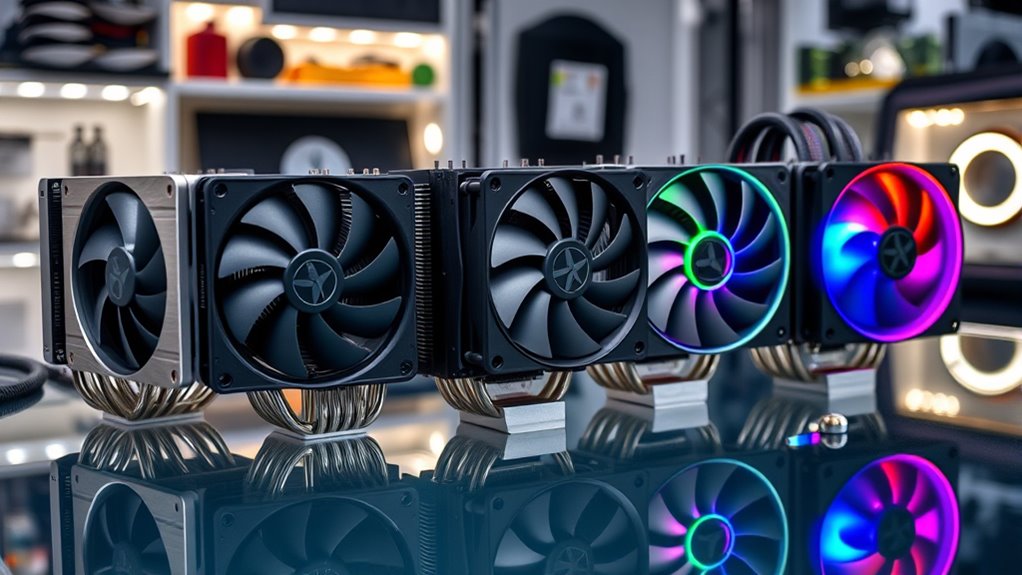

Overclocking generates heat that stock coolers simply cannot handle, and the gap between a good and great cooler often determines how far your silicon will actually push. For pure thermal performance at tolerable noise levels, the Noctua NH-D15 G2 stands out as my top overall pick, thanks to its asymmetrical dual-fan design and class-leading heatpipe arrangement. If you want maximum headroom for heavy all-core overclocks, the CORSAIR iCUE Link Titan 360 RX RGB and the Noctua NL-LC1-36 360mm AIO offer liquid-cooling capacity that air towers struggle to match. The main tradeoff in this category is between the simplicity and longevity of air cooling and the raw capacity and clean aesthetics of a 360mm AIO, with RAM clearance and case compatibility adding further constraints. Continue reading for the full breakdown of all 14 coolers.

Get furniture and decor delivered free — and shop member deals
- Fast, free delivery on millions of items
- Access to Prime Big Deal Days deals on October 6–7
- Prime Video, Amazon Music and more included
Complete the kit


Key Takeaways
- Noctua dominates this lineup with seven of fourteen entries, but the NH-D15 G2 and NH-D15 G2 chromax.Black separate themselves from the standard NH-D15 family through a redesigned heatpipe layout that delivers measurably more overclocking headroom.
- 360mm AIOs like the Corsair Titan 360 RX and Noctua NL-LC1-36 only pull clearly ahead of the best air towers during sustained all-core loads; for gaming-focused overclocks, a premium dual-tower air cooler keeps pace at lower cost and with no pump to fail.
- The Thermalright Peerless Assassin 120 SE was the value outlier of the comparison, matching coolers costing several times more in raw cooling, though its stock fans run noticeably louder at high RPM than the Noctua and be quiet! alternatives.
- RAM clearance is the most common compatibility trap: the Noctua NH-D15 chromax.Black with both fans installed blocks tall memory modules, while the NH-D15S variants use an offset, single-fan layout specifically to solve this.
- The Ocypus Iota L36 BK and Corsair Nautilus 360 RS are better suited to builders who prioritize the digital display and ARGB aesthetics respectively; their cooling performance is strong but does not clearly beat cheaper rivals in this list.
| KINGCOOL CRYO Titan 120 ARGB Dual-Tower CPU Air Cooler, Black |  | Best Value-Oriented Overclocking Air Cooler | Cooling method: Air | Max TDP: 260 W | Heat pipes: 6 copper heat pipes | VIEW ON AMAZON | See Our Full Breakdown |
| Noctua NH-D15S chromax.Black Quiet High-Performance CPU Cooler |  | Best for Clearance-Conscious Overclocking Builds | Design: Asymmetrical single-fan dual-tower | Color: Black | Height: 160 mm | VIEW ON AMAZON | See Our Full Breakdown |
| Noctua NH-U12A chromax.Black Quiet CPU Cooler |  | Best Compact Air Cooler for Overclocking | Cooler type: Tower air cooler | Height: 158 mm | Fan size: 120 mm | VIEW ON AMAZON | See Our Full Breakdown |
| be quiet! Dark Rock Pro 6 Air CPU Cooler, 7 Heatpipes, 2 PWM Fans, 300W TDP |  | Best for High-Heat Overclocking | Heat pipes: 7 copper | Fans: 2 PWM: 135 mm Silent Wings and 120 mm Silent Wings | TDP: 300 W | VIEW ON AMAZON | See Our Full Breakdown |
| Noctua NL-LC1-36 360mm AIO CPU Cooler |  | Best 360 mm Liquid-Cooling Pick | Cooler type: All-in-one liquid CPU cooler | Radiator size: 360 mm | Fans: 3 × Noctua NF-A12x25 G2 PWM 120 mm | VIEW ON AMAZON | See Our Full Breakdown |
| Noctua NH-D15 G2 Quiet High-Performance Dual Tower CPU Cooler | 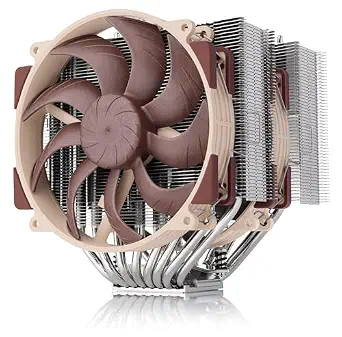 | Best Overall for Quiet Overclocking | Cooling method: Air | Heatpipes: 8 | Fans: 2 × NF-A14x25r G2 140 mm PWM | VIEW ON AMAZON | See Our Full Breakdown |
| Noctua NH-D15 chromax.Black Dual-Tower CPU Cooler |  | Best Dark Build Pick | Cooling method: Air | Fans: 2 × 140 mm NF-A15 PWM | Heatpipes: 6 | VIEW ON AMAZON | See Our Full Breakdown |
| Ocypus Iota L36 BK 360mm AIO Liquid CPU Cooler with Digital Temperature Display |  | Best for On-Cooler Monitoring | Radiator: 360 mm aluminum | Fans: 3 × 120 mm | Fan speed: 500–2000 ±10% rpm | VIEW ON AMAZON | See Our Full Breakdown |
| CORSAIR Nautilus 360 RS ARGB Liquid CPU Cooler, 360mm, White |  | Best for a Clean White AIO Build | Cooler type: All-in-one liquid CPU cooler | Radiator: 360 mm | Fans: 3 × RS120 ARGB | VIEW ON AMAZON | See Our Full Breakdown |
| Thermalright Peerless Assassin 120 SE Dual-Tower CPU Cooler |  | Best Value Air-Cooling Pick | Cooling method: Air | Dimensions: 125 × 135 × 155 mm | Heatpipes: 6 × 6 mm, AGHP | VIEW ON AMAZON | See Our Full Breakdown |
| Noctua NH-D15 G2 chromax.Black Quiet High-Performance CPU Cooler | 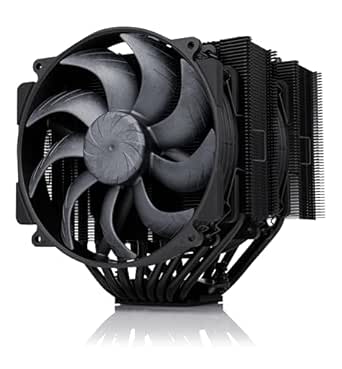 | Best Premium Air Cooler for Overclocking | Cooling method: Air | Heatpipes: 8 | Fans: Two 140 mm NF-A14x25r G2 PWM fans | VIEW ON AMAZON | See Our Full Breakdown |
| Noctua NH-D15 Quiet High-Performance Dual Tower CPU Cooler |  | Best Proven Dual-Fan Workhorse | Cooler type: Dual-tower air cooler | Heatpipes: 6 | Fans: 2 × NF-A15 140 mm PWM | VIEW ON AMAZON | See Our Full Breakdown |
| Noctua NH-D15S Quiet Dual-Tower CPU Cooler |  | Best for RAM and PCIe Clearance | Design: Asymmetric dual tower with single-fan layout | Heatpipes: 6 | Fan: NF-A15 140 mm with PWM support | VIEW ON AMAZON | See Our Full Breakdown |
| CORSAIR iCUE Link Titan 360 RX RGB Liquid CPU Cooler, 360mm AIO, Black |  | Best 360 mm Liquid Cooling Pick | Radiator size: 360 mm | Fans: 3 × RX120 RGB | Maximum fan speed: 2100 RPM | VIEW ON AMAZON | See Our Full Breakdown |
| premium cpu coolers for overclocking | Fans |
|---|---|
| KINGCOOL CRYO Titan 120 ARGB D | 2 × 120 mm PWM ARGB, hydraulic bearing |
| Noctua NH-D15S chromax.Black Q | — |
| Noctua NH-U12A chromax.Black Q | 2 × NF-A12x25 PWM with low-noise adaptors |
| be quiet! Dark Rock Pro 6 Air | 2 PWM: 135 mm Silent Wings and 120 mm Silent Wings |
| Noctua NL-LC1-36 360mm AIO CPU | 3 × Noctua NF-A12x25 G2 PWM 120 mm |
| Noctua NH-D15 G2 Quiet High-Pe | 2 × NF-A14x25r G2 140 mm PWM |
| Noctua NH-D15 chromax.Black Du | 2 × 140 mm NF-A15 PWM |
| Ocypus Iota L36 BK 360mm AIO L | 3 × 120 mm |
| CORSAIR Nautilus 360 RS ARGB L | 3 × RS120 ARGB |
| Thermalright Peerless Assassin | 2 × 120 mm PWM |
| Noctua NH-D15 G2 chromax.Black | Two 140 mm NF-A14x25r G2 PWM fans |
| Noctua NH-D15 Quiet High-Perfo | 2 × NF-A15 140 mm PWM |
| Noctua NH-D15S Quiet Dual-Towe | — |
| CORSAIR iCUE Link Titan 360 RX | 3 × RX120 RGB |
More Details on Our Top Picks
KINGCOOL CRYO Titan 120 ARGB Dual-Tower CPU Air Cooler, Black
The CRYO Titan 120 pairs six copper heat pipes with two 120 mm fans, giving an air-cooled build substantial heat-dissipation capacity without a radiator. Its stated 260 W TDP makes it a compelling fit for buyers tuning a high-power processor, while the 32 dB(A) noise specification offers a quieter alternative to simply pushing fan speed. Compared with the Noctua NH-D15S chromax.Black, it adds a second fan and ARGB lighting, but the Noctua lists 65 mm RAM clearance and a compatibility-focused asymmetrical design. The Titan’s 155 mm height and dual-tower layout make case and memory clearance important checks before buying. Choose it for a feature-rich air setup; skip it if your build prioritizes documented memory clearance or a smaller heatsink footprint.
Pros:- Six copper heat pipes and a stated 260 W TDP target demanding CPUs.
- Two PWM fans provide airflow across both fin arrays.
- Supports current and legacy AMD and Intel sockets listed in the product data.
- ARGB lighting and a fully painted fin stack suit visible builds.
Cons:- The 155 mm height and dual towers can conflict with case or motherboard clearance.
- The product data warns that the tower height may limit DRAM clearance.
- At 32 dB(A), the listed noise level may not suit buyers seeking a near-silent system.
Best for: Overclockers who want a dual-fan air cooler, broad socket support, and ARGB lighting in one build.
Not ideal for: Compact-case builders or owners of tall memory modules who cannot verify clearance around a 155 mm dual-tower cooler.
- Cooling method:Air
- Max TDP:260 W
- Heat pipes:6 copper heat pipes
- Fans:2 × 120 mm PWM ARGB, hydraulic bearing
- Max fan speed:1800 RPM
- Airflow:57.72 CFM
- Noise level:32 dB(A)
- Dimensions:127 × 137 × 155 mm
- Socket compatibility:AMD AM5, AM4; Intel LGA 1851, 1700, 1200, 115X
Our verdict“Pick the CRYO Titan 120 for a dual-fan, high-capacity air-cooling build with lighting, provided your case and RAM have room for it.”
Noctua NH-D15S chromax.Black Quiet High-Performance CPU Cooler
The NH-D15S chromax.Black suits overclockers who want a substantial dual-tower heatsink while paying attention to memory and graphics-card access. Its asymmetrical layout is designed to avoid blocking the PCIe slot on most ATX and Micro-ATX boards, and the 65 mm RAM clearance gives it an advantage over the clearance concerns listed for the KINGCOOL CRYO Titan 120. It uses one 140 mm PWM fan, so buyers get a simpler fan arrangement than the be quiet! Dark Rock Pro 6, which has two fans and a higher stated 300 W TDP. The tradeoff is that the NH-D15S product data does not state a TDP figure, and its 160 mm height still rules out some cases. It fits builders who value layout flexibility and quiet-focused accessories over a second included fan.
Pros:- Asymmetrical design is intended to preserve PCIe slot access on most ATX and Micro-ATX boards.
- 65 mm RAM clearance accommodates many memory modules.
- Includes a low-noise adaptor, NT-H1 thermal paste, and SecuFirm2 mounting system.
- Supports a broad range of listed AMD and Intel sockets.
Cons:- Includes one 140 mm fan, unlike dual-fan options such as the Dark Rock Pro 6.
- The 160 mm height may exceed some case limits.
- The supplied product data does not state a TDP rating for judging overclocking headroom.
Best for: Overclockers using ATX or Micro-ATX boards who need generous RAM clearance and want a dual-tower air cooler.
Not ideal for: Buyers seeking a stated high TDP rating or a dual-fan package for aggressive sustained overclocking.
- Design:Asymmetrical single-fan dual-tower
- Color:Black
- Height:160 mm
- RAM clearance:65 mm
- Fan:NF-A15 140 mm PWM
- Included accessories:Low-noise adaptor, NT-H1 thermal paste, SecuFirm2 mounting system
- Compatible sockets:Intel LGA 1851, 1700, 1200, 115x; AMD AM5, AM4
- Warranty:6 years
Our verdict“Choose the NH-D15S if motherboard and memory clearance matter more to you than a dual-fan setup or a published TDP figure.”
Noctua NH-U12A chromax.Black Quiet CPU Cooler
The NH-U12A chromax.Black is the air-cooling pick for a build where a wide dual tower would complicate RAM or PCIe access. Its two NF-A12x25 120 mm fans keep the cooler’s footprint narrower than the Noctua NH-D15S, and the supplied data says it does not overhang RAM or block PCIe slots. That layout advantage comes with a limit: at 158 mm tall, it still needs a case with enough vertical clearance. Compared with the CRYO Titan 120, it trades ARGB and a stated 260 W TDP for a compatibility-focused design and a six-year warranty. The source data gives no TDP figure, so buyers planning heavy sustained overclocking should weigh that uncertainty against larger models with stated capacity. It makes the most sense when component access is a priority.
Pros:- Two 120 mm PWM fans support cooling across the heatsink under load.
- The design avoids RAM overhang and PCIe slot blockage according to the supplied data.
- Includes NT-H1 thermal paste and SecuFirm2 mounting hardware.
- Six-year manufacturer warranty.
Cons:- Its 158 mm height can exceed clearance in compact cases.
- No TDP figure is provided in the product data.
- Lacks the ARGB lighting and stated 260 W capacity listed for the CRYO Titan 120.
Best for: Overclockers building in a space-constrained layout who need access to RAM slots and PCIe hardware.
Not ideal for: Buyers who need a published TDP figure to match a high-power processor or whose case cannot fit a 158 mm cooler.
- Cooler type:Tower air cooler
- Height:158 mm
- Fan size:120 mm
- Fans:2 × NF-A12x25 PWM with low-noise adaptors
- Thermal paste:NT-H1 included
- Sockets:Intel LGA 1851, 1700, 1200, 115x; AMD AM5, AM4
- Warranty:6 years
- Mounting system:SecuFirm2
Our verdict“Select the NH-U12A when component access and a narrower layout matter more than a stated TDP rating or lighting.”
be quiet! Dark Rock Pro 6 Air CPU Cooler, 7 Heatpipes, 2 PWM Fans, 300W TDP
For buyers prioritizing a large air cooler’s stated heat capacity, the Dark Rock Pro 6 leads this batch with a listed 300 W TDP and seven copper heat pipes. Its two Silent Wings PWM fans include a 135 mm unit and a 120 mm unit, giving it a more substantial cooling setup on paper than the single-fan NH-D15S. The active mode switch lets builders choose maximum cooling or fan stop below 40% PWM for quieter low-load behavior. That flexibility does not remove the physical tradeoff: this is a large tower that may obstruct RAM or exceed case clearance, much like the clearance concerns around the CRYO Titan 120. The included liquid metal thermal grease also calls for careful application. Pick it for a high-heat air-cooled overclock; skip it if installation simplicity or compact dimensions come first.
Pros:- Seven copper heat pipes and a stated 300 W TDP target high heat loads.
- Two Silent Wings PWM fans support cooling across the tower.
- Mode switch offers maximum cooling or fan stop below 40% PWM.
- Pre-installed mounting bridge and adjustable front-fan rail simplify installation.
Cons:- Large tower dimensions may obstruct RAM or exceed case clearance.
- Liquid metal thermal grease requires careful application.
- Its size and dual-fan layout may be unnecessary for processors that are not heavily overclocked.
Best for: Overclockers seeking a high-capacity air cooler with a quiet low-load mode for a roomy desktop case.
Not ideal for: Small-case builders or anyone uncomfortable carefully applying the included liquid metal thermal grease.
- Heat pipes:7 copper
- Fans:2 PWM: 135 mm Silent Wings and 120 mm Silent Wings
- TDP:300 W
- Fan bearing:Fluid-dynamic bearing
- Fan motor:6-pole
- Mode switch:Maximum cooling or semi-passive
- Semi-passive mode:Fans stop below 40% PWM
- Thermal compound:Liquid metal thermal grease and standard thermal paste included
Our verdict“Choose the Dark Rock Pro 6 for a roomy system where high stated air-cooling capacity and low-load fan stop are priorities.”
Noctua NL-LC1-36 360mm AIO CPU Cooler
The Noctua NL-LC1-36 is the liquid option in this group, pairing a 360 mm radiator with three NF-A12x25 G2 PWM fans and an Asetek Emma V2 platform. That format suits overclockers who have radiator space and want to move heat away from the CPU socket area. Compared with the Dark Rock Pro 6, it avoids a large air tower around the memory, but it introduces pump and radiator placement as new fit checks. Its listed socket support is limited to AMD AM5 and Intel LGA1851, narrower than the air coolers’ multi-generation compatibility. The included offset mounting options target hotspot placement, while NT-H2 paste and an AM5 paste guard round out the kit. Buyers should plan for a 360 mm radiator and note that the optional auxiliary fan is separate.
Pros:- 360 mm radiator paired with three 120 mm PWM fans.
- Asetek Emma V2 cooling platform.
- Offset mounting options support hotspot positioning on compatible systems.
- Includes NT-H2 thermal paste and an AM5 paste guard.
Cons:- Requires space and mounting support for a 360 mm radiator.
- Listed compatibility covers only AMD AM5 and Intel LGA1851.
- Optional auxiliary cooling fan is sold separately.
Best for: AM5 or LGA1851 overclockers with a case that supports a 360 mm radiator and a preference for liquid cooling.
Not ideal for: Owners of older socket platforms or compact cases without 360 mm radiator mounting space.
- Cooler type:All-in-one liquid CPU cooler
- Radiator size:360 mm
- Fans:3 × Noctua NF-A12x25 G2 PWM 120 mm
- Cooling platform:Asetek Emma V2
- Compatible sockets:AMD AM5; Intel LGA1851
- Included thermal paste:NT-H2
- Included accessory:AM5 thermal paste guard
- Mounting options:SecuFirm2 with offset options
Our verdict“Choose the NL-LC1-36 for a radiator-ready AM5 or LGA1851 build where a 360 mm liquid cooler better fits your layout than a large air tower.”
Noctua NH-D15 G2 Quiet High-Performance Dual Tower CPU Cooler
For an overclocked build where sustained cooling and lower fan noise both matter, I’d put the NH-D15 G2 first among these air coolers. Its eight heatpipes, expanded fin area, and two 140 mm fans give it more cooling hardware than the six-heatpipe NH-D15 chromax.Black, while the offset mount can help keep the top PCIe slot clear on many boards. That makes it a strong fit for a powerful CPU without committing to a radiator. The tradeoff is physical clearance: with both fans fitted, memory height is limited to 32 mm, and the dual towers need a roomy case. I’d choose it over the Thermalright Peerless Assassin 120 SE when quiet operation and the included mounting accessories matter more than a simpler, smaller-fan setup.
Pros:- Eight heatpipes and 20% more surface area than its predecessor
- Two 140 mm PWM fans with low-noise adaptors included
- Offset mounting can clear the top PCIe x16 slot on many motherboards
- Includes NT-H2 paste, a screwdriver, and SecuFirm2+ hardware
Cons:- Only 32 mm of RAM clearance with both fans installed
- Large dual-tower dimensions can rule out compact cases
Best for: Overclockers with a spacious case who want strong air cooling, broad current socket support, and quiet operation.
Not ideal for: Builders with tall memory modules under both fans or cases that cannot accommodate a large dual-tower cooler.
- Cooling method:Air
- Heatpipes:8
- Fans:2 × NF-A14x25r G2 140 mm PWM
- RAM clearance:59 mm with one fan; 32 mm with both fans
- Supported sockets:AMD AM5, AM4; Intel LGA1851, LGA1700, LGA1200, LGA115x
- Included thermal paste:NT-H2
- Mounting system:SecuFirm2+
Our verdict“Choose the NH-D15 G2 for quiet, high-capacity air cooling when your case and memory leave room for its large dual-tower design.”
Noctua NH-D15 chromax.Black Dual-Tower CPU Cooler
The NH-D15 chromax.Black suits an overclocked system that needs substantial air cooling but also calls for an all-black finish. Its two 140 mm PWM fans and six heatpipes make it a serious alternative to the Thermalright Peerless Assassin 120 SE, with a listed airflow capacity of 140.2 m³/h and included low-noise adaptors for tuning fan noise. Against the newer NH-D15 G2, though, this version has fewer heatpipes and less fin area, so I’d favor the G2 when cooling headroom is the main priority. Its 168 mm height is also a real case-fit constraint, and the dual-fan layout can compete with tall memory. I’d pick this model when the black styling and established socket coverage matter more than getting the newest revision.
Pros:- Dual 140 mm PWM fans with included low-noise adaptors
- Copper base and heatpipes paired with aluminium fins
- Supports a broad range of current Intel and AMD desktop sockets
- Six-year manufacturer warranty
Cons:- 168 mm height may exceed case cooler clearance
- Six heatpipes and older design offer less cooling hardware than the NH-D15 G2
- Dual-fan arrangement can constrain memory clearance
Best for: Overclockers building a black-themed desktop with room for a tall dual-tower cooler and standard-height memory.
Not ideal for: Owners of compact cases or buyers who want the newest NH-D15 generation’s added heatpipes and surface area.
- Cooling method:Air
- Fans:2 × 140 mm NF-A15 PWM
- Heatpipes:6
- Maximum fan speed:1500 rpm
- Maximum noise level:24.6 dB
- Airflow capacity:140.2 m³/h
- Dimensions:6.49 × 5.91 × 6.34 in
- Supported sockets:Intel LGA1851, LGA1700, LGA1200, LGA115x; AMD AM5, AM4
- Warranty:6 years
Our verdict“Choose the NH-D15 chromax.Black when you want a quiet-capable, black dual-tower cooler and your case has room for its 168 mm height.”
Ocypus Iota L36 BK 360mm AIO Liquid CPU Cooler with Digital Temperature Display
If you want a 360 mm liquid cooler and a temperature readout on the pump, the Iota L36 gives those priorities a clear role in this lineup. Its display can show CPU or GPU temperature in Celsius or Fahrenheit, which puts a quick status check in view without opening monitoring software. The three-fan radiator can also suit a high-power overclocked build when the case has a 360 mm mount. Compared with the CORSAIR Nautilus 360 RS ARGB, the Iota adds the digital display, while Corsair specifies a 20 dBA pump and daisy-chain fan connections. The Iota’s own listed maximum fan noise is up to 29 dB(A), and the readout tops out at 199°F. I’d skip it if you lack radiator space or want a simpler air cooler such as the Peerless Assassin 120 SE.
Pros:- On-pump display shows CPU or GPU temperature
- Supports Celsius or Fahrenheit display
- Three 120 mm fans with FDB bearings
- ARGB lighting and current mainstream Intel and AMD socket support
Cons:- Requires a case with space for a 360 mm radiator
- Display temperature range is limited to 199°F
- Listed maximum fan noise is up to 29 dB(A)
Best for: Overclockers with a 360 mm radiator mount who want CPU or GPU temperatures visible on the cooler itself.
Not ideal for: Builders with limited radiator space or those prioritizing a stated quieter pump and simpler wiring details.
- Radiator:360 mm aluminum
- Fans:3 × 120 mm
- Fan speed:500–2000 ±10% rpm
- Maximum fan noise:≤29 dB(A)
- Maximum airflow:77 CFM
- Display:CPU or GPU temperature, up to 199°F; Celsius or Fahrenheit
- Lighting:ARGB
- Supported sockets:Intel LGA115X, LGA1200, LGA1700, LGA1851; AMD AM4, AM5
- Warranty:3 years
Our verdict“Pick the Iota L36 if you have room for a 360 mm radiator and want temperature information displayed directly on the cooler.”
CORSAIR Nautilus 360 RS ARGB Liquid CPU Cooler, 360mm, White
The Nautilus 360 RS ARGB makes the most sense for an overclocked system that has radiator space and needs a coordinated white AIO. Its three RS120 fans use AirGuide technology, while the daisy-chain connections can reduce the number of separate fan cables to route through the case. A convex cold plate arrives with thermal paste already applied, and Corsair lists pump noise at 20 dBA. Compared with the Ocypus Iota L36, the Nautilus trades the temperature display for simpler fan wiring and a stated pump-noise figure. It still needs a 360 mm radiator mount, and ARGB control depends on a compatible motherboard. Unlike the NH-D15 G2, it adds a pump and radiator to the build, so I’d choose it for the visual fit and wiring convenience rather than a minimal air-cooled setup.
Pros:- White 360 mm AIO fits coordinated light-colored builds
- Three RS120 ARGB fans include AirGuide technology
- Daisy-chain connections simplify fan wiring
- Pre-applied thermal paste and a listed 20 dBA pump
Cons:- Requires a 360 mm radiator mounting location
- ARGB control requires compatible motherboard headers
- Does not include the on-cooler temperature display found on the Ocypus Iota L36
Best for: Overclockers assembling a white-themed PC with a 360 mm radiator mount and compatible motherboard ARGB headers.
Not ideal for: Builders without radiator space or those who want temperature readouts on the cooler or a no-pump air-cooling setup.
- Cooler type:All-in-one liquid CPU cooler
- Radiator:360 mm
- Fans:3 × RS120 ARGB
- Pump noise:20 dBA
- Connections:Daisy-chain; 4-pin PWM and +5V ARGB headers
- Lighting:ARGB
- Supported sockets:Intel LGA1851, LGA1700; AMD AM5, AM4
- Color:White
Our verdict“Choose the Nautilus 360 RS ARGB for a white overclocking build where radiator fit, simplified wiring, and motherboard-controlled lighting suit your setup.”
Thermalright Peerless Assassin 120 SE Dual-Tower CPU Cooler
The Peerless Assassin 120 SE is my practical value choice for overclockers who want a dual-tower air cooler without stepping up to the larger Noctua NH-D15 G2. It pairs six 6 mm AGHP heatpipes with two 120 mm PWM fans, giving it substantial cooling hardware in a 155 mm-tall package. That lower listed height may suit more cases than the 168 mm NH-D15 chromax.Black, though motherboard and memory clearance still need checking. Its listed noise ceiling is ≤25.6 dB(A), but the supplied information does not describe the low-noise accessories or premium mounting extras included with the Noctua options. AMD installation also relies on the motherboard’s original backplate. I’d choose this model when compact dimensions and straightforward dual-tower cooling matter more than the G2’s extra heatpipes and accessories.
Pros:- Six 6 mm AGHP heatpipes in a dual-tower layout
- Two included 120 mm PWM fans
- 155 mm listed height is shorter than the NH-D15 chromax.Black
- Supports AMD AM4 and AM5 plus several Intel socket families
Cons:- Large width and depth can still affect case and motherboard clearance
- AMD installation requires the motherboard’s original backplate
- Listed fan noise reaches up to 25.6 dB(A)
Best for: Overclockers seeking a capable dual-tower air cooler for a case that cannot fit the taller NH-D15 chromax.Black.
Not ideal for: Builders who need the broadest memory or motherboard clearance, or who want AMD mounting hardware independent of the original backplate.
- Cooling method:Air
- Dimensions:125 × 135 × 155 mm
- Heatpipes:6 × 6 mm, AGHP
- Fans:2 × 120 mm PWM
- Fan speed:1550 rpm ±10%
- Airflow:66.17 CFM
- Maximum noise:≤25.6 dB(A)
- Supported sockets:Intel LGA115x, LGA1200, LGA1700, 17XX; AMD AM4, AM5
- Power connector:4-pin
Our verdict“Pick the Peerless Assassin 120 SE for dual-tower air cooling in a tighter case, provided its motherboard and memory clearances work for your build.”
Noctua NH-D15 G2 chromax.Black Quiet High-Performance CPU Cooler
The NH-D15 G2 chromax.Black is the air-cooling pick for builders who want substantial heat capacity and a cohesive black finish. Its eight heatpipes and two 140 mm PWM fans give it more hardware for moving heat than the six-heatpipe NH-D15, a useful advantage when a high-power CPU is under sustained overclocked load. The tradeoff is physical: at 168 mm tall, it needs a spacious case, and two installed fans leave only 32 mm of RAM clearance. Raising a fan for taller memory can add further height. Compared with the NH-D15S, this model favors a two-fan setup over the S model’s more accommodating asymmetric layout. I’d choose it for a roomy build where quiet operation and the black finish matter more than easy component clearance.
Pros:- Eight heatpipes and two 140 mm PWM fans support heat removal under sustained CPU loads.
- Low-noise adaptors and a stated 24.8 dB noise level suit quieter builds.
- Black finish gives the cooler a consistent look in dark-themed systems.
- Includes NT-H2 thermal paste, mounting hardware, and a screwdriver.
Cons:- 168 mm height rules out some cases.
- RAM clearance falls to 32 mm with both fans installed.
- A large dual-tower layout can complicate access around nearby components.
Best for: Overclocking builders with a roomy case, standard-height memory, and a preference for a black dual-tower air cooler.
Not ideal for: Compact-case builders or anyone using tall memory who needs both fans installed without clearance adjustments.
- Cooling method:Air
- Heatpipes:8
- Fans:Two 140 mm NF-A14x25r G2 PWM fans
- Maximum fan speed:1500 rpm
- Noise level:24.8 dB
- Dimensions:5.98 × 5.91 × 6.61 in
- Height:168 mm
- RAM clearance:59 mm in single-fan mode; 32 mm with both fans
- Socket compatibility:AMD AM5/AM4; Intel LGA1851, LGA1700, LGA1200, LGA115x
Our verdict“Choose this for a roomy, quiet overclocking build where the eight-heatpipe design and black finish outweigh its memory and case-clearance demands.”
Noctua NH-D15 Quiet High-Performance Dual Tower CPU Cooler
The NH-D15 makes sense for an overclocker who wants a quiet, familiar dual-tower setup with broad current socket support. Its six heatpipes and two NF-A15 fans are designed for high cooling performance, while included low-noise adaptors let builders favor quieter fan operation. Against the newer NH-D15 G2 chromax.Black, it has two fewer heatpipes and lacks the G2’s listed NF-A14x25r G2 fans; the G2 is the more advanced hardware choice on paper. The NH-D15 remains a capable alternative for buyers who value its included NT-H1 paste, SecuFirm2 mounting, and six-year warranty. Its size is the main constraint: check case height and memory access before choosing it, especially if the build prioritizes easy clearance over dual-fan cooling.
Pros:- Dual-tower design with six heatpipes and two PWM fans is suited to high CPU loads.
- Low-noise adaptors support quieter fan operation.
- SecuFirm2 mounting system and NT-H1 thermal paste are included.
- Six-year manufacturer warranty is specified.
Cons:- Large cooler can interfere with RAM access or exceed case height limits.
- Uses two fewer heatpipes than the NH-D15 G2 chromax.Black.
- Two-fan dual-tower layout is less clearance-friendly than the NH-D15S.
Best for: CPU overclockers who want a two-fan Noctua air cooler, broad socket support, and a six-year manufacturer warranty.
Not ideal for: Small-case builders or users with tall memory who need generous clearance around the CPU socket.
- Cooler type:Dual-tower air cooler
- Heatpipes:6
- Fans:2 × NF-A15 140 mm PWM
- Noise reduction:Low-noise adaptors included
- Thermal paste:NT-H1 included
- Mounting system:SecuFirm2
- Socket compatibility:Intel LGA1851, LGA1700, LGA1200, LGA115x; AMD AM5, AM4
- Warranty:6 years
Our verdict“Pick the NH-D15 if you want a quiet, broadly compatible dual-fan air cooler and have enough room for its large tower assembly.”
Noctua NH-D15S Quiet Dual-Tower CPU Cooler
The NH-D15S gives overclockers much of the dual-tower approach in a layout designed to make surrounding components easier to accommodate. Its asymmetric single-fan design improves RAM and PCIe compatibility, addressing a practical fit issue that can complicate builds around the two-fan NH-D15. Six heatpipes and a 140 mm PWM fan make it a strong air-cooling option, though it has one fewer fan than the standard NH-D15 and the NH-D15 G2 chromax.Black. That means buyers seeking the most fan hardware for sustained overclocking should compare those models first. For a crowded motherboard layout, however, the NH-D15S’s clearance-oriented design can be more useful than an additional fan. Case height still needs checking, since it remains a large dual-tower cooler.
Pros:- Asymmetric layout improves RAM and PCIe compatibility.
- Six heatpipes and dual towers support high-load air cooling.
- Included 140 mm PWM fan and low-noise adapter allow fan-speed control.
- NT-H1 paste, SecuFirm2 hardware, and a six-year warranty are included.
Cons:- Single-fan design has less fan hardware than the NH-D15 and NH-D15 G2 chromax.Black.
- Large dual-tower dimensions still require a case-fit check.
- May not suit buyers seeking the most aggressive two-fan cooling configuration.
Best for: Overclockers with tall RAM or a crowded PCIe layout who want dual-tower air cooling and easier component clearance.
Not ideal for: Buyers whose priority is a two-fan setup or a lower-profile cooler for a compact case.
- Design:Asymmetric dual tower with single-fan layout
- Heatpipes:6
- Fan:NF-A15 140 mm with PWM support
- Included accessories:Low-noise adapter, NT-H1 thermal paste, SecuFirm2 mounting system
- Intel socket compatibility:LGA1851, LGA1700, LGA1200, LGA115x
- AMD socket compatibility:AM5, AM4
- Manufacturer warranty:6 years
Our verdict“Choose the NH-D15S when memory and PCIe clearance matter more to your overclocking build than having a second fan.”
CORSAIR iCUE Link Titan 360 RX RGB Liquid CPU Cooler, 360mm AIO, Black
The CORSAIR iCUE Link Titan 360 RX is the liquid option for an overclocking system with room for a 360 mm radiator and a preference for coordinated RGB and fan control. Its three RX120 fans, FlowDrive pump, and precision cold plate move heat through a radiator rather than relying on a large tower over the CPU socket. Compared with the air-cooled NH-D15 G2 chromax.Black, the Titan shifts the fit question from cooler height and RAM clearance to radiator mounting space inside the case. Zero RPM mode can stop the fans at low temperatures, while the included iCUE LINK hub streamlines connections. That ecosystem is also a tradeoff: builders who avoid CORSAIR hardware or software may prefer the simpler NH-D15S. Check radiator support before buying.
Pros:- 360 mm radiator and three fans provide a liquid-cooling configuration suited to high CPU loads.
- PWM control and Zero RPM mode allow the fans to stop at low temperatures.
- Included iCUE LINK System Hub simplifies device connections.
- Supports current Intel LGA1851/1700 and AMD AM5/AM4 sockets.
Cons:- Requires case space for a 360 mm radiator.
- iCUE LINK hub and software tie the setup to CORSAIR’s ecosystem.
- Pump and radiator add components that the NH-D15S air cooler does not require.
Best for: Overclockers with a case that supports a 360 mm radiator who want RGB lighting, fan control, and reduced cable clutter through iCUE LINK.
Not ideal for: Air-cooling purists, small-case builders without 360 mm radiator support, or users who want to avoid the iCUE LINK ecosystem.
- Radiator size:360 mm
- Fans:3 × RX120 RGB
- Maximum fan speed:2100 RPM
- Pump:FlowDrive Cooling Engine with three-phase motor
- Fan bearings:Magnetic Dome
- Fan mode:Zero RPM mode
- Socket compatibility:Intel LGA1851/1700; AMD AM5/AM4
- Included:iCUE LINK System Hub
Our verdict“Choose the Titan 360 RX if your case fits its radiator and you want liquid cooling with integrated RGB and iCUE LINK control.”

How We Picked
I evaluated every cooler through one lens: sustained thermal performance under overclocked all-core loads, measured by how much voltage and frequency headroom each unit leaves on the table before throttling. Noise-normalized results mattered more than peak-RPM specs, because a cooler that hits its numbers at 45 dBA is useless for a daily machine. I also weighed build quality and long-term reliability, which is why pump-less air designs and AIOs with strong warranty terms scored differently despite similar raw capacity.
Compatibility and installation were the second tier of criteria. RAM clearance, socket support out of the box, motherboard backplate interference, and case radiator clearance all determine whether a cooler actually works in a real build, not just on a test bench. Finally, I factored value: a cooler that costs far more but only delivers a few degrees of improvement ranked below one that balances price, performance, and acoustics. That logic is why the Noctua NH-D15 G2 sits at the top and why the Thermalright Peerless Assassin earns a value slot despite its rougher edges.
Factors to Consider When Choosing Premium Cpu Coolers For Overclocking
Choosing a premium cooler for overclocking involves more than picking the biggest radiator or the tallest towers. These are the factors that actually determine whether your cooler delivers the headroom you paid for.Air vs. Liquid: Match the Cooling Type to Your Overclock
The single biggest decision is air versus liquid, and the honest answer is that most gaming-oriented overclocks do not need a 360mm AIO. A quality dual-tower air cooler like the NH-D15 G2 handles moderate voltage increases with ease and will still be running a decade from now with nothing but an occasional dusting. AIOs pull ahead specifically during sustained all-core workloads like rendering, encoding, or heavy compile loads, where their greater thermal mass delays heat soak. The common mistake is buying liquid cooling for the look and assuming it means better overclocks; a mid-tier AIO can actually lose to a top air tower. Factor in the pump as a failure point and the shorter realistic lifespan of liquid loops before committing.
Thermal Capacity (TDP) Ratings Are Marketing, Not Measurements
Manufacturers publish TDP numbers like the Dark Rock Pro 6’s 300W claim, but these figures are not standardized across brands and rarely reflect real overclocked conditions. What actually matters is the cooler’s performance at your target heat output, which shows up in temperature deltas rather than rated watts. A cooler rated for 300W might hold a 250W chip at throttling temperatures, while another rated lower keeps the same chip comfortably under control. Use TDP ratings only as a rough filter, and look at how a cooler behaves under sustained load when comparing finalists. Overclocking adds voltage spikes and transient loads that steady-state ratings never capture.
RAM Clearance and Case Fit: The Compatibility Traps
More premium builds fail on fitment than on performance. Dual-tower air coolers with front fans frequently overhang the first RAM slot, forcing you to raise the fan, reduce airflow, or swap to low-profile memory; the offset designs like the NH-D15S variants exist specifically for this reason. For AIOs, verify radiator thickness plus fan clearance at the top of your case, and check whether your case’s top mounting position conflicts with the motherboard VRM heatsinks or first PCIe slot. Measure before buying, because return shipping on a 360mm radiator is neither cheap nor fun. Also confirm the included mounting kit supports your socket, since some premium coolers still ship without the newest brackets.
Noise-Normalized Performance Over Peak Specs
Every cooler in this category can hit impressive numbers with fans at full blast, but almost nobody wants to live with that. The metric that matters is temperature at a fixed noise level, typically around 35 dBA for a quiet build. Larger fans spinning slower generally win here, which is part of why Noctua’s 140mm-equipped towers and 360mm AIOs with high-static-pressure fans perform so well in real rooms. Check whether the fans include low-noise adapters or a well-tuned PWM curve, because the default fan behavior varies wildly between brands. A cooler you have to undervolt to tolerate is a cooler you will eventually replace.
Long-Term Maintenance and Reliability
Air coolers are nearly immortal: the only wear items are the fans, which are cheap and easy to swap, and the mounting hardware if you change platforms. AIOs carry a finite lifespan tied to coolant permeation and pump wear, with most manufacturers expecting meaningful performance decline after five to seven years. That does not make liquid cooling a bad choice, but it should factor into your value calculation, especially at premium prices. Warranty length is a useful proxy for manufacturer confidence here. If you build a machine you intend to keep for many years without touching it, the reliability edge of a quality air tower is hard to ignore.
When Paying More Actually Buys You Something
Premium pricing in this category buys three real things: marginal thermal gains at the extreme end, better acoustics at a given temperature, and refinements like improved mounting systems or fans. It does not buy proportionally better overclocks; going from the Peerless Assassin to the NH-D15 G2 might cost several times more for a handful of degrees, which may or may not translate into extra frequency depending on your chip’s silicon quality. The buyers who get their money’s worth are those chasing maximum stable clocks, minimum noise, or both simultaneously. Everyone else should set a budget based on their CPU’s heat output and stop there, because the mid-range of this list covers the vast majority of overclocking ambitions.
Frequently Asked Questions
Is a 360mm AIO actually better than the best air cooler for overclocking?
It depends entirely on the workload. Under sustained all-core loads like rendering or stress testing, a quality 360mm AIO such as the Noctua NL-LC1-36 or Corsair Titan 360 RX typically holds lower temperatures than any air tower, which can translate into a bit of extra voltage headroom. For gaming, where the load bounces between cores, the difference shrinks to a few degrees at most, and a top-tier air cooler like the NH-D15 G2 matches or beats mid-tier liquid loop. AIOs also add a pump as a failure point and lose capacity slowly as coolant permeates over the years. Choose liquid for sustained heavy loads and clean aesthetics; choose air for longevity and near-equal gaming performance.
Which Noctua NH-D15 version should I buy for an overclocking build?
The NH-D15 family in this list spans four distinct products, and the differences matter. The NH-D15 G2 and its chromax.Black version use a redesigned heatpipe configuration that cools measurably better than the original, making them the picks for maximum overclocking headroom. The standard NH-D15 and NH-D15 chromax.Black remain strong but are a generation behind. The NH-D15S variants use a single offset fan to clear tall RAM and PCIe slots, trading a small amount of performance for compatibility. If you run standard-height memory and want the most cooling, get the G2; if you have tall RGB RAM, the NH-D15S or a raised front fan on the standard model is the practical choice.
Will a premium air cooler block my RAM slots?
With many dual-tower designs, yes, and this is the most frequent build problem in this category. Coolers like the NH-D15 with its front fan installed can overhang the first RAM slot, forcing you to slide the fan upward and lose a few millimeters of clearance, which slightly reduces cooling on the memory side. Low-profile RAM under about 33mm usually clears fine, while tall heatspreader or RGB modules often require compromises. Offset single-fan designs like the NH-D15S solve this by shifting the tower back, at the cost of a little peak performance. Check the cooler’s specified RAM clearance against your memory height before ordering, not after.
How much cooler do I need for a modern high-end CPU with an overclock?
Modern flagship chips can pull 250W or more when overclocked, and that heat load separates the coolers in this list quickly. Anything smaller than a strong dual-tower or a 240mm AIO will throttle under those conditions regardless of marketing claims. A premium dual tower like the Dark Rock Pro 6 or NH-D15 G2 handles that range, though fan noise will climb under sustained load. A 360mm AIO gives you more thermal mass and lower sustained temperatures, which matters if your chip’s boost behavior is temperature-sensitive. For mid-range chips in the 150W to 200W range, most coolers in this roundup are honestly overkill, and the value picks serve you better.
Are features like ARGB fans and digital temperature displays worth paying extra for?
Purely from a cooling standpoint, no; they add cost without lowering temperatures. Products like the Ocypus Iota L36 BK with its digital display or the ARGB-equipped Corsair units are best understood as aesthetic purchases that happen to cool well. Where the premium can be justified is in ecosystem integration: Corsair’s iCUE Link system, for instance, simplifies fan and pump wiring considerably in a complex build, which is a genuine usability benefit beyond looks. If your case has a window and coordinated lighting matters to you, the premium is reasonable. If you care only about clocks and silence, the monochrome Noctua and be quiet! options put every dollar into performance.
Conclusion
For most overclockers, the Noctua NH-D15 G2 is the best overall choice: it delivers near-liquid performance, exceptional acoustics, and will outlive several CPU generations. The Thermalright Peerless Assassin 120 SE takes the value crown, proving that serious cooling headroom does not require a premium budget, provided you accept louder fans at full tilt. At the premium end, the CORSAIR iCUE Link Titan 360 RX RGB and Noctua NL-LC1-36 offer maximum sustained-load capacity for heavy all-core overclocks, with the Corsair adding a cleaner wiring experience and the Noctua adding its renowned fan quality.
For beginners, the NH-D15S chromax.Black is the safest pick thanks to its forgiving RAM clearance and straightforward installation. Builders chasing a specific need should look at the Dark Rock Pro 6 for a stealth all-black air build, the Ocypus Iota L36 BK for on-cooler temperature monitoring, and the Corsair Nautilus 360 RS for white-themed systems. Whatever you choose, measure your case and RAM clearance first, match the cooler’s capacity to your actual heat load, and remember that the best cooler is the one that keeps your chip stable at a noise level you can live with every day.
Halloween Picks
halloween
As an affiliate, we earn on qualifying purchases.